
Wireguard Server/Client
We use Wireguard VPN client on hangdevice because it allows us to have a secure privat IPv4 (and possibly IPv6) tunnel to a known server. This also works in case the public IPv6 system of Freifunk fails (which was tested a lot). That means that Wireguard is the preferred way to communicate from external networks.
Server side
We use our existing WIreguard server. See Wireguard VPN Server
hangdevice Client
Install Wireguard and add some interface
#on hangdevice - see https://www.sigmdel.ca/michel/ha/wireguard/wireguard_02_en.html (client)
echo "deb http://deb.debian.org/debian/ unstable main" | sudo tee --append /etc/apt/sources.list.d/unstable.list
apt-key adv --keyserver keyserver.ubuntu.com --recv-keys 04EE7237B7D453EC
printf 'Package: *\nPin: release a=unstable\nPin-Priority: 150\n' | sudo tee --append /etc/apt/preferences.d/limit-unstable
apt update
apt install wireguard -y
reboot
Create peer key pair (for client)
wg genkey | tee peeroneprivatekey | wg pubkey > peeronepublickeyvim /etc/wireguard/wg0.conf [Interface] Address = 192.168.11.2/24 Privatekey = PPKofClient #DNS = 1.1.1.1 [Peer] PublicKey = PubKeyOfServer #AllowedIPs = 0.0.0.0/0 AllowedIPs = 192.168.11.0/16 Endpoint = the.wireguard.server:54321 PersistentKeepalive = 25
Start Wireguard (as service)
systemctl enable wg-quick@wg0
wg-quick up wg0
wg #show info
wg-quick save wg0 #save that info immediately

#stop
#wg-quick down wg0
udpdump Test Wireguard (Client + Server)
If the command wg does not show a line with "handshake" on the client, then the connection was not established. If wg shows no peers on the server, this also means that no connection was established by a client.
#on server:
netstat -anlup | grep 54321
ps aux | grep wireguard
ss -lun 'sport = :54321'
tcpdump -i bond1 udp port 54321 -vv -X

#on client (hangdevice)
echo -n "blah:36|c" | nc -w 1 -u -4 the.wireguard.server 54321

#on server:
18:55:42.919037 IP (tos 0x0, ttl 54, id 4198, offset 0, flags [DF], proto UDP (17), length 37)
    gianotti.chemnitz.freifunk.net.36882 > 192.168.1.66.54321: [udp sum ok] UDP, length 9
        0x0000:  4500 0025 1066 4000 3611 fbe1 a3ac d2e9  E..%.f@.6.......
        0x0010:  c0a8 0142 9012 d431 0011 cb82 626c 6168  ...B...1....blah
        0x0020:  3a33 367c 6300 0000 0000 0000 0000       :36|c........
wg #run this on client and on server each. It should return peer connections on both sides plus successful handshake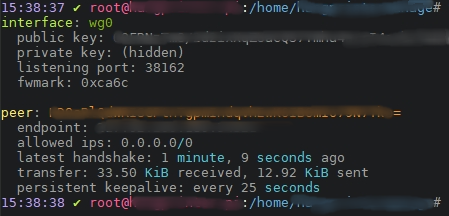
Troubleshooting
RTNETLINK answers: Operation not supported (Kernel Update / Firmware Update)
[#] ip link add wg0 type wireguard
RTNETLINK answers: Operation not supported
Unable to access interface: Protocol not supported
[#] ip link delete dev wg0
Cannot find device "wg0"

modprobe wireguard
modprobe: FATAL: Module wireguard not found in directory /lib/modules/4.19.118-v7+

#fix variant 1
dpkg-reconfigure wireguard-dkms

#fix variant 2
sudo apt remove wireguard-dkms
sudo apt install wireguard-dkms

#fix variant 3 - make recent headers manually
sudo apt-get install git bc bison flex libssl-dev
sudo wget https://raw.githubusercontent.com/notro/rpi-source/master/rpi-source -O /usr/local/bin/rpi-source && sudo chmod +x /usr/local/bin/rpi-source && /usr/local/bin/rpi-source -q --tag-update
cd ~/
rpi-source

#in case of failure:
cd ~/
rm -rf linux-fe2c7bf4cad4641dfb6f12712755515ab15815ca/
rpi-source
Helpful ressources
- https://www.sebastian-fritz.net/2019/01/28/wireguard-vpn-und-ubuntu-18-04
- https://www.bachmann-lan.de/raspberry-pi-mit-wireguard-als-vpn-server-mit-wireguard
- https://www.linode.com/docs/networking/vpn/set-up-wireguard-vpn-on-ubuntu
- https://www.thomas-krenn.com/de/wiki/Ubuntu_18.04_als_WireGuard_VPN_Client_konfigurieren
- https://emanuelduss.ch/2018/09/wireguard-vpn-road-warrior-setup
Keine Kommentare vorhanden
Keine Kommentare vorhanden