
Monitoring and alerting | Longterm monitoring of Duet 2 and automatic Hotend PowerOff/Movement Stop
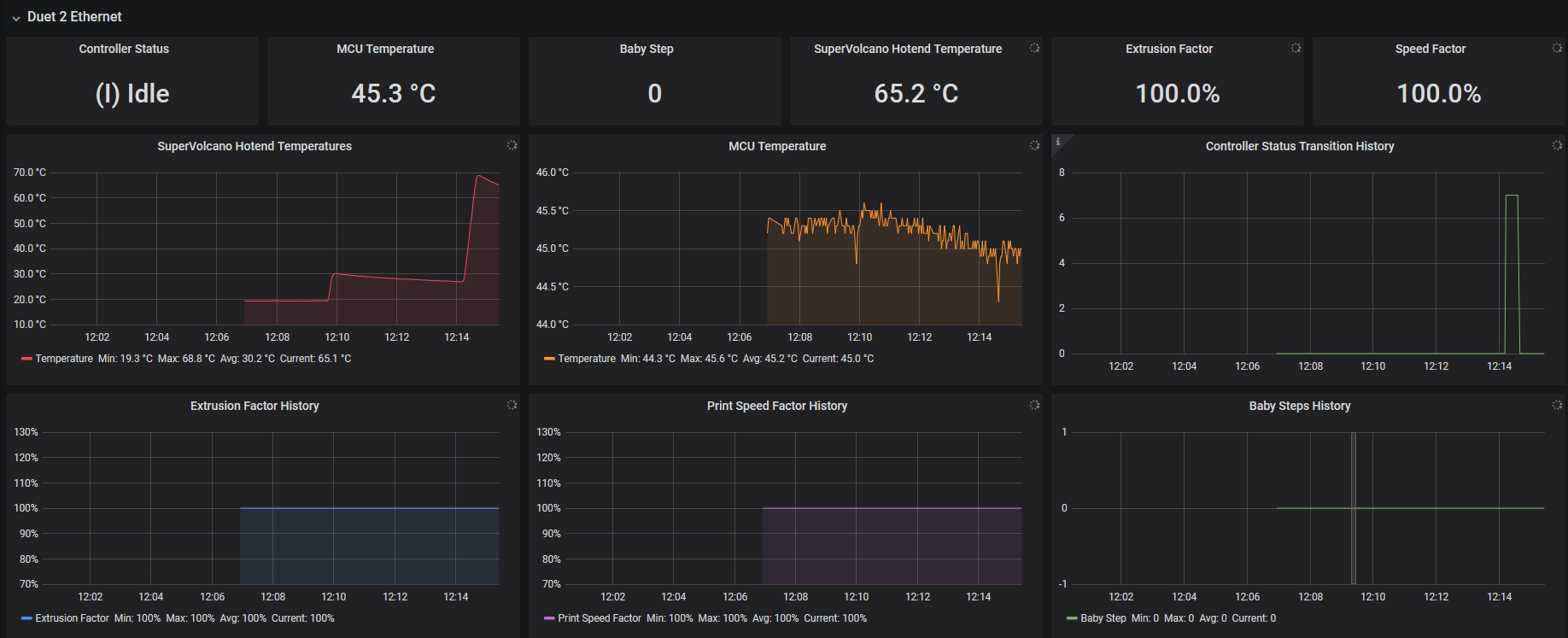
To monitor some important values from Duet Trikarus project is going to monitor different values like MCU temperature or general printer status. This is done by triggering M408 S4 GCode. In Repetier Server a callback function is registered to monitor this command and append the output to the callback log / websocket stream. A bash script takes this information and parses it. The parsed data will be pushed into InfluxDB. The data is graphically evaluated by Grafana instance.
We are using this script to monitor if the printer idles but hotend is still active, too. In case Duet is running a GCode sequence, it's status is "busy". While heating up it's "idle". Because the old Duet firmware has no built-in watcher to check if the printer is heating while not printing. Our script is not 100% safe because we need to trust into a working network connection (we already defined an extra value "-2" for Duet polling). But it still helps to perform emergency shutdowns in case we forgot to turn off the printer correctly.
Another job is to monitor if Repetier Server is still sending job data even the printer controller got not enough voltage to run the motors (e.g. power loss or emergency stop button pushed). In this case the print job silently continues which creates unusuably situation and it would mean if the power comes back the printer would just move to some unknown weird position. We omit this by triggering the @pause command which gets interpreted by Repetier Server to stop the gcode data feed. By the way "Warning: VIN under-voltage event" message get's written into log line by Duet.
We could also use Smart Stepper ABCD position data to check if the printer really moves while it is printing.
Warning. Under some circumstances "Warning: Communication timeout - resetting communication buffer." will appear. Then you might need to reset Duet by web interface (in case Repetier Server interface reset does not properly work and no USB response)
Create Repetier Server callback
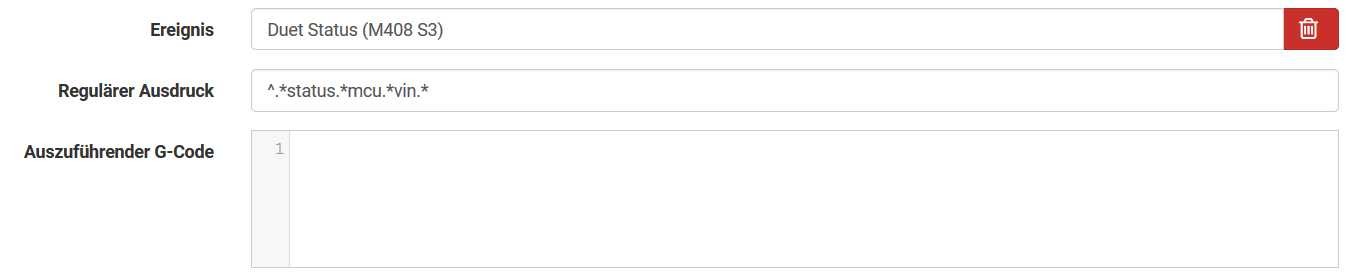
The bash script
vim /opt/duet_status.sh#!/bin/bash
# this script will read the current IP Adress by using a pre-defined custom event in Repetier Server. Please see documentation for more details on how to do that
source "/opt/repetier-conf.sh" #source config for Repetier Server instance
PID_FILE="/opt/duet_status.pid"
case "$1" in
start)
#get the scripts own PID number
echo $$>"$PID_FILE"
IDLE_TIMEOUT=900 #We turn off the extruder after 15 minutes (15 * 60 = 900 seconds)
LAST_IDLE_TIME="" #we store the last timestamp where printer was in an idling state
while true; do
echo "_______________________________"
echo LAST_IDLE_TIME=$LAST_IDLE_TIME
#LAST_IDLE_TIME="" #we store the last timestamp where printer was in an idling state
STATUS="-999" #reset status because we are in a while loop
#authenticate
curl --silent "duetdevice/rr_connect?password=somePw" > /dev/null
if [ $? == 7 ]; then
STATUS="-2" #network connection could not be established
fi
#get status response from Duet (note that if previous authentication is some seconds too old it will fail because you need to re-authenticate) - regular output is "{"err":0,"sessionTimeout":8000,"boardType":"duetethernet102"}"
LOG_LINE=$(curl --silent "duetdevice/rr_status?type=2")
#echo $LOG_LINE
#status mapping (InfluxDB cannot store characters):
# -1=O=Offline
# 0=I=idle
# 1=P=printing from SD card
# 2=S=stopped (i.e. needs a reset)
# 3=C=running config file (i.e starting up)
# 4=A=paused
# 5=D=pausing
# 6=R=resuming from a pause
# 7=B=busy (e.g. running a macro)
# 8=F=performing firmware update
# 9=T=changing tool
# 10=M=simulating
# 11=H=halt
# Warning: the following lines will fail if the configuration of firmware changes (number of hotends for example)
if [[ ! $STATUS == "-2" ]]; then
STATUS=$(jq -r '.|{status}|.status' <<< ${LOG_LINE})
fi
MCU_TEMP=$(jq -r '.|{temps}|.[]|{extra}|.[]|.[]|.temp' <<< ${LOG_LINE})
HOTEND_ACTIVE=$(jq -r '.|{temps}|.[]|{tools}|.[]|{active}|.[]|.[]|.[]' <<< ${LOG_LINE})
HOTEND_TEMP=$(jq -r '.|{temps}|.[]|{current}|.[]|.[0]' <<< ${LOG_LINE})
SPEEDFACTOR=$(jq -r '.|{params}|.[]|{speedFactor}|.speedFactor' <<< ${LOG_LINE})
EXTRFACTOR=$(jq -r '.|{params}|.[]|{extrFactors}|.[]|.[0]' <<< ${LOG_LINE})
BABYSTEP=$(jq -r '.|{params}|.[]|{babystep}|.[]' <<< ${LOG_LINE})
VIN=$(jq -r '.|.vin|{cur}|.[]' <<< ${LOG_LINE})
Z_COORD=$(jq -r '.|{coords}|.[]|{xyz}|.[]|.[2]' <<< ${LOG_LINE})
#now replace Status with integer values for InfluxDB
STATUS=$(echo ${STATUS/O/-1})
STATUS=$(echo ${STATUS/I/0})
STATUS=$(echo ${STATUS/P/1})
STATUS=$(echo ${STATUS/S/2})
STATUS=$(echo ${STATUS/C/3})
STATUS=$(echo ${STATUS/A/4})
STATUS=$(echo ${STATUS/D/5})
STATUS=$(echo ${STATUS/R/6})
STATUS=$(echo ${STATUS/B/7})
STATUS=$(echo ${STATUS/F/8})
STATUS=$(echo ${STATUS/T/9})
STATUS=$(echo ${STATUS/M/10})
STATUS=$(echo ${STATUS/H/11})
# note that space white characters destroy the --data-binary. So watch them exactly!
# if errors occure values might need to be converted from int to float! (missing yet)
if [[ $STATUS == "-2" ]]; then
echo "Duet is not connected by LAN"
#MCU_TEMP=99999
#HOTEND_ACTIVE=99999
#HOTEND_TEMP=99999
#SPEEDFACTOR=99999
#EXTRFACTOR=99999
#BABYSTEP=99999
#VIN=99999
#Z_COORD=99999
# note that space white characters destroy the --data-binary. So watch them exactly!
curl --silent -k -XPOST "http://localhost:8086/write?db=trikarus" --data-binary "duet_ethernet,host=hangdevice.fablabchemnitz.de status=${STATUS}" --user dbUser:dbPass > /dev/null
else
#################
# Movement Watchdog (pause print iff Duet status is "OFFLINE" and VIN is below minimum
#################
if [[ $STATUS == -1 ]] && [[ $VIN < 23 ]]; then
echo "Current VIN is below the supply voltage required to be able to print. Pausing print (if a print job is running at the moment)"
send_gcode '@pause' #ToDo: add some check if already paused to avoid @pause spamming
fi
#################
# Hotend Watchdog
#################
echo "Hotend Watchdog is active"
if [[ $HOTEND_ACTIVE == "0" ]]; then
echo "ok" > /dev/null #everything fine. Hotend is off (target temperature is exactly zero).
echo "Hotend is off. everything fine"
LAST_IDLE_TIME="" #okidoki. We reset the timestamp again to clear the last information
else
echo "Hotend is active (target temperature is $HOTEND_ACTIVE degrees). Checking if i should turn off"
#Hotend is on. Checking whats up.
if [[ $STATUS == "0" ]] || [[ $STATUS == "2" ]] || [[ $STATUS == "8" ]]; then #Duet is still/again idling, stopped or is doing firmware upgrade.
echo "Duet is still/again idling"
if [[ -z "$LAST_IDLE_TIME" ]]; then #only if LAST_IDLE_TIME is empty we overwrite with a new time information
LAST_IDLE_TIME=$(date '+%s') #We store that timestamp
echo LASTIDLE_TIME=$LAST_IDLE_TIME
fi
else
if [[ $STATUS == "7" ]]; then
echo "Printer is printing at the moment!"
fi
LAST_IDLE_TIME="" #okidoki. We reset the timestamp again to clear the last information
fi
fi
if [[ ! -z "$LAST_IDLE_TIME" ]]; then #if LAST_IDLE_TIME is not empty
CURRENT_TIME=$(date '+%s')
TIME_DIFF=$(($CURRENT_TIME - $LAST_IDLE_TIME))
echo TIME_DIFF=$TIME_DIFF
if [[ "$TIME_DIFF" -gt "$IDLE_TIMEOUT" ]]; then #We turn off the extruder after reaching timeout
send_gcode "M104 S0" #turn off the extruder remotely
send_gcode "M106 S0" #turn off the part cooling fan remotely
echo "Heater was turned off by script (idle)"
echo "" | mail -s "Heater was turned off by script (idle)" somemail@somedomain.de
fi
fi
#################
# Write InfluxDB
#################
#echo "Writing regular Duet values to InfluxDB"
echo STATUS=$STATUS
echo MCU_TEMP=$MCU_TEMP
echo HOTEND_ACTIVE=$HOTEND_ACTIVE
echo HOTEND_TEMP=$HOTEND_TEMP
echo SPEEDFACTOR=$SPEEDFACTOR
echo EXTRFACTOR=$EXTRFACTOR
echo BABYSTEP=$BABYSTEP
echo VIN=$VIN
echo Z_COORD=$Z_COORD
curl --silent -k -XPOST "http://localhost:8086/write?db=trikarus" --data-binary "duet_ethernet,host=device.fablabchemnitz.de status=${STATUS},mcu_temp=${MCU_TEMP},hotend_temp=${HOTEND_TEMP},speedfactor=${SPEEDFACTOR},extrfactor=${EXTRFACTOR},babystep=${BABYSTEP},vin=${VIN},z_coord=${Z_COORD}" --user dbUser:dbPass> /dev/null
fi
sleep 1 #wait to generate not too much data
done #end of while loop
;;
stop)
pkill -P `cat "$PID_FILE"`
rm "$PID_FILE"
;;
restart)
$0 stop
$0 start
;;
status)
if [ -e "$PID_FILE" ]; then
echo Service is still running, pid=`cat "$PID_FILE"`
else
echo Service is NOT running
exit 1
fi
;;
*)
echo "Usage: $0 {start|stop|status|restart}"
esac
exit 0chmod +x /opt/duet_status.shInstall as service
vim /opt/duet_status.service[Unit]
After=network.target
Description=Duet Ethernet Controller Status Service
[Service]
Type=simple
ExecStart=/opt/duet_status.sh start
ExecStop=/opt/duet_status.sh stop
KillMode=process
Restart=on-failure
RestartSec=10
RemainAfterExit=no
User=root
Group=root
[Install]
WantedBy= multi-user.targetsystemctl enable /opt/duet_status.service
service duet_status restart && journalctl -f -u duet_status.serviceDropping old values
influx

use trikarus
drop series from duet_ethernet
show series
show measurements
Create Grafana dashboard
Keine Kommentare vorhanden
Keine Kommentare vorhanden