
Raspberry Pi 3 B - power optimizations and boot adjustments
Raspberry Pi overview
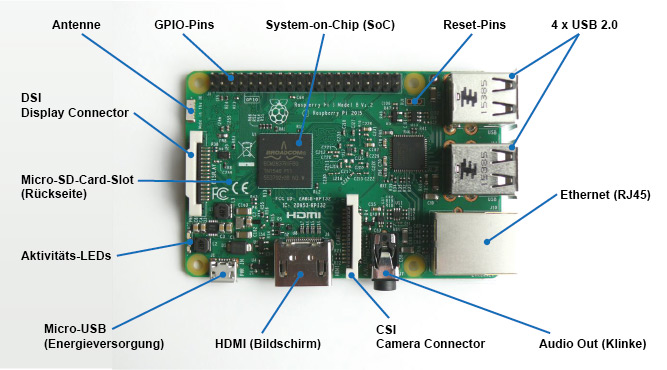
Image source: https://www.elektronik-kompendium.de/sites/raspberry-pi/1905251.htm
HDMI deactivation
HDMI is disabled by default if no monitor is connected. If a monitor is connected this can be either enabled or disabled manually by the following commands
/opt/vc/bin/tvservice -o
#or sh vcgencmd display_power 1

#re-enable with
sudo /opt/vc/bin/tvservice -p
Bluetooth and WiFi deactivation (this is not going to be applied to Trikarus!)
vim /boot/config.txt#dtoverlay=disable-wifi #enabled again! (backup remote connection)
#dtoverlay=disable-bt #enabled again! (filament weigh sub project requires to have it enabled)Status LED deactivation (saves ~30 mA)
Red PWR LED
- on if power OK
- flashes (or goes out) if the power drops below about 4.63V
Green ACT LED
-
steady on if no SD card during boot
-
irregular flashes for SD card access
Ethernet Socket Left LED (yellow)
-
on 100-Mbps connection
-
off 10-Mbps connection
Ethernet Socket Right LED (green)
-
on if link established
-
flashes for port activity
-
off if no link is established
Version 1 (is not used)
vim /boot/config.txtdtparam=act_led_trigger=none
dtparam=act_led_activelow=onVersion 2 (is used)
vim /opt/disable_leds.sh#!/bin/bash
echo none > /sys/class/leds/led0/trigger
echo none > /sys/class/leds/led1/trigger
echo 0 > /sys/class/leds/led0/brightness
echo 0 > /sys/class/leds/led1/brightnesschmod +x /opt/disable_leds.shvim /etc/cron.d/disable_leds# this script disables Raspberry Pi LEDs after bootup
SHELL=/bin/sh
PATH=/usr/local/sbin:/usr/local/bin:/sbin:/bin:/usr/sbin:/usr/bin
*/1 * * * * root /opt/disable_leds.shCPU throttling (this is not going to be applied to Trikarus!)
- https://learn.pi-supply.com/make/how-to-save-power-on-your-raspberry-pi/#throttle-cpu
- https://www.raspberrypi.org/documentation/configuration/config-txt/overclocking.md
vim /boot/config.txtarm_freq_min=250
core_freq_min=100
sdram_freq_min=150
over_voltage_min=0USB deactivation
See Smart Stepper - USB, Soft and hard reset for USB scripts
Audio deactivation
vim /boot/config.txtdtparam=audio=offUSB power and Raspberry Pi undervoltage
It seems possible to reduce the total allowed load from 1200 mA to 600 mA → https://www.raspberrypi.org/documentation/configuration/config-txt/misc.md
It was tested but seems to make no difference. So it was not applied to Trikarus configuration
max_usb_current=1 #1200 mA
max_usb_current=0 #600 mA
Problem description
- dmesg shows detected undervoltage at startup
- Monitoring shows the same undervoltage peak
Webcam might not be available due to error while adressing USB devices
[ 55.651885] usb 1-1.5: device not accepting address 11, error -110
[ 55.751888] usb 1-1.5: new high-speed USB device number 13 using dwc_otg
[ 66.291906] usb 1-1.5: device not accepting address 13, error -110
[ 66.292050] usb 1-1-port5: unable to enumerate USB device
Solution
- not known yet. USV is built to deliver more than 10 Watt at USB but Raspberry Pi never draws more than 4.35 W (see General power/wiring concept, consumptions and temperatures for measurements values)
GPU memory and troubleshooting "failed to open VCHI service (-1)"
This is okay/harmless message. The GPU memory was set to 16 MB in /boot/config.txt so some services are not available with such low memory.
/boot/config.txt Overview
Some default values were changed to the following:
dtparam=i2c_arm=on
dtparam=audio=off
gpu_mem=16 #GUI not used so use the memory for better things
boot_delay=3 #did not really help to omit the once per bootup occuring undervoltage but may help to wait for connected USB Stick
Keine Kommentare vorhanden
Keine Kommentare vorhanden