
Smart Stepper - flashing the firmware
How to change Vendor / Product ID?
For a better control of the dev rules for Smart Stepper the Vendor IDs and product IDs can be changed! This omits to connect to static / fixed ports.
https://github.com/Misfittech/nano_stepper/issues/47#issuecomment-583914737
vim %appdata%\..\Local\Arduino15\packages\misfittech\hardware\samd\1.0.0\boards.txt

nano_zero.vid.0=0x1209
nano_zero.pid.0=0x8087
nano_zero.vid.1=0x1209
nano_zero.pid.1=0x8086
nano_zero.build.vid=0x1209
nano_zero.build.pid=0x8087
Trikarus custom firmware fork modifications
Trikarus uses custom firmware which is a mix of hangprinter smart stepper fork and recent misfit tech repo (fw 0.40) - ci https://github.com/Misfittech/nano_stepper/commit/ddaf3ad388c0788647d27a625718b9728841248b
- https://gitlab.com/tobben/Smart-Stepper-for-Hangprinter/issues/1
- i2c stuff not implemented:
- https://gitlab.com/tobben/Smart-Stepper-for-Hangprinter/commit/47369f7ec7f921d845d138c8990ac040f617614e
- https://gitlab.com/tobben/Smart-Stepper-for-Hangprinter/commit/4d296668e11170089cbb9fd477c03788c4c5b3a0
- https://gitlab.com/tobben/Smart-Stepper-for-Hangprinter/commit/8fecdd1dda00aae269401cd1b4c4951bb27ae762
- https://gitlab.com/tobben/Smart-Stepper-for-Hangprinter/commit/e547967287961c84273519bf4dc00aaefabdf21f
- https://gitlab.com/tobben/Smart-Stepper-for-Hangprinter/commit/367fc4db3d0e22351c8864890462f9dd021fe2ee
Flashing directly from Windows client
http://misfittech.net/blog/arduino-package-install
https://github.com/microsoft/uf2
Install Arduino IDE
Version 1.6.4 or greater is required → Download
Add custom boards manager URL
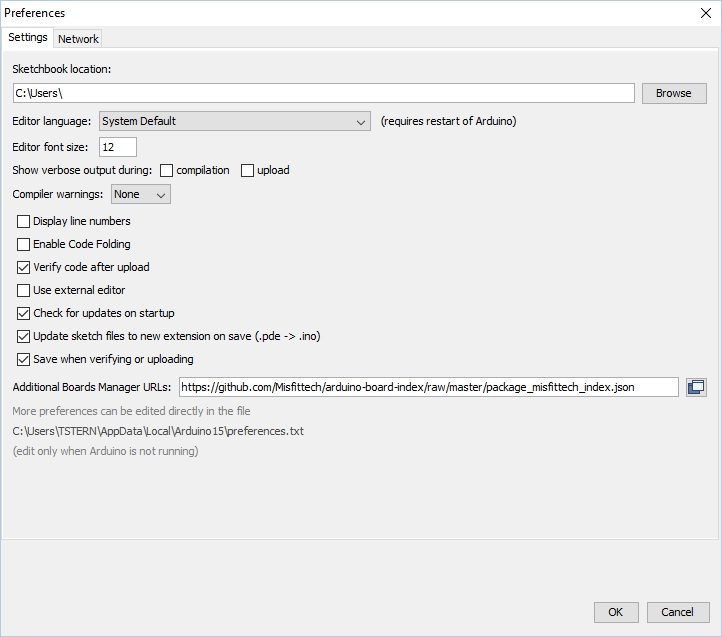
Now we add the Misfit Tech package by URL. To do this open the preferences page on the IDE by going to File → Preferences. Add "https://github.com/Misfittech/arduino-board-index/raw/master/package_misfittech_index.json"
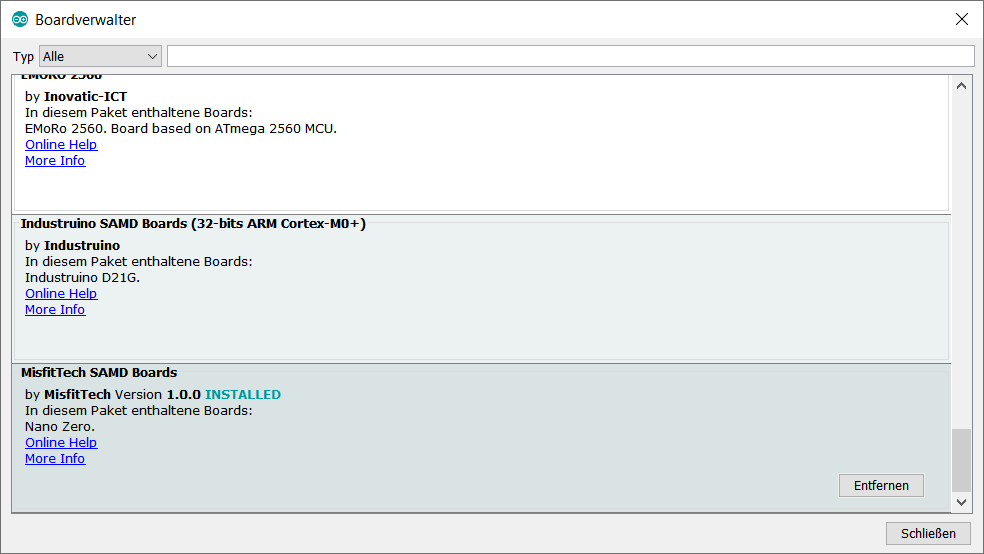
Install Board Manager "MisfitTech SAMD Boards"
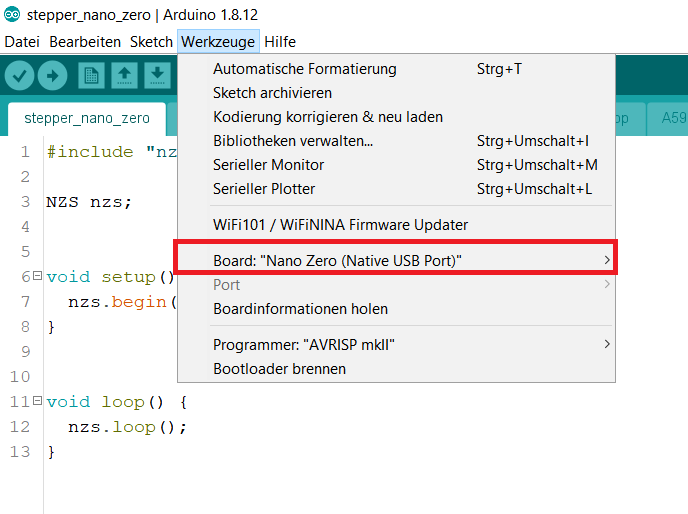
Flash
Flashing directly from Raspberry Pi (where the motors are connected to by USB serial)
Install Arduino IDE
#install arduino
apt install arduino
Please note that arduino command requires X11 forward to work because it's a windowed application.
Check if arduino-cli is existent
if not: install it using the following command. It will be installed into /usr/bin/arduino-cl
cd /usr
curl -fsSL https://raw.githubusercontent.com/arduino/arduino-cli/master/install.sh | sh
Initialize and configure
arduino-cli config init

#edit the newly generated config file
vim ~/.arduino15/arduino-cli.yaml
board_manager:
additional_urls:
- "https://github.com/Misfittech/arduino-board-index/raw/master/package_misfittech_index.json"
daemon:
port: "50051"
directories:
data: /root/.arduino15
downloads: /root/.arduino15/staging
user: /root/Arduino
logging:
file: ""
format: text
level: info
telemetry:
addr: :9090
enabled: trueUpdate Index
arduino-cli core update-indexDownloading missing tool builtin:ctags@5.8-arduino11...
builtin:ctags@5.8-arduino11 downloaded
Installing builtin:ctags@5.8-arduino11...
builtin:ctags@5.8-arduino11 installed
Downloading missing tool builtin:serial-discovery@1.0.0...
builtin:serial-discovery@1.0.0 downloaded
Installing builtin:serial-discovery@1.0.0...
builtin:serial-discovery@1.0.0 installed
Updating index: library_index.json downloaded
Updating index: package_index.json downloaded
Updating index: package_misfittech_index.json downloadedInstall Smart Stepper Board Support
#this may take up to 5 minutes
arduino-cli core install misfittech:samd
Downloading packages...
arduino:arm-none-eabi-gcc@4.8.3-2014q1 downloaded
arduino:bossac@1.6.1-arduino downloaded
arduino:openocd@0.9.0-arduino downloaded
arduino:CMSIS@4.0.0-atmel downloaded
misfittech:samd@1.0.0 downloaded
Installing arduino:arm-none-eabi-gcc@4.8.3-2014q1...
arduino:arm-none-eabi-gcc@4.8.3-2014q1 installed
Installing arduino:bossac@1.6.1-arduino...
arduino:bossac@1.6.1-arduino installed
Installing arduino:openocd@0.9.0-arduino...
arduino:openocd@0.9.0-arduino installed
Installing arduino:CMSIS@4.0.0-atmel...
arduino:CMSIS@4.0.0-atmel installed
Installing misfittech:samd@1.0.0...
Error during install: extracting archive: open /home/hangprintermanage/.arduino15/tmp/package-880721797: is a directoryThis fails with error. You can fix it manually:
mkdir -p ~/.arduino15/packages/misfittech/hardware/samd/
cd ~/.arduino15/packages/misfittech/hardware/samd/
wget https://github.com/Misfittech/arduino-board-index/raw/master/boards/misfittech_samd-1.0.0.tar.bz2
tar jxf misfittech_samd-1.0.0.tar.bz2
rm misfittech_samd-1.0.0.tar.bz2
mv misfittech_samd-1.0.0/ 1.0.0/
Check if installed properly
arduino-cli core listID Installed Latest Name
misfittech:samd 1.0.0 1.0.0 MisfitTech SAMD BoardsFor information only: get device list
Get the list of real /dev devices. The ttyUSB-SMART* are only symlinks
ls -l /dev/serial/by-id
ls -alF /dev |grep ttyUSB-SMART
python3.7 -m serial.tools.list_ports
arduino-cli board list #get the connected USB device
Compile ad upload fresh .bin files to Smart Stepper devices
Do the following steps as the user who installed arduino and configured arduino-cli
mkdir -p /home/hangprintermanage/firmware_smartstepper_trikarus/stepper_nano_zero
#copy *.ino and sketch files into /home/hangprintermanage/stepper_nano_zero/

#at the top level of the directory
cd /home/hangprintermanage/firmware_smartstepper_trikarus/stepper_nano_zero/

#compile the sketch (get stepper_nano_zero.misfittech.samd.nano_zero.bin file)
arduino-cli compile --fqbn misfittech:samd:nano_zero

#upload the sketch - note that /dev/ttyUSB-SMART* symlinks do not work. You need the real tty names. You can use readlink to find correct tty behind symlinks
arduino-cli upload -p $(readlink -f /dev/ttyUSB-SMART-A-AXIS) --fqbn misfittech:samd:nano_zero && sleep 4 && screen /dev/ttyUSB-SMART-A-AXIS
arduino-cli upload -p $(readlink -f /dev/ttyUSB-SMART-B-AXIS) --fqbn misfittech:samd:nano_zero && sleep 4 && screen /dev/ttyUSB-SMART-B-AXIS
arduino-cli upload -p $(readlink -f /dev/ttyUSB-SMART-C-AXIS) --fqbn misfittech:samd:nano_zero && sleep 4 && screen /dev/ttyUSB-SMART-C-AXIS
arduino-cli upload -p $(readlink -f /dev/ttyUSB-SMART-D-AXIS) --fqbn misfittech:samd:nano_zero && sleep 4 && screen /dev/ttyUSB-SMART-D-AXIS
More advanced compilation and upload with known calibration values
In case the Smart Steppers should not be moved it's a good idea to prevent Smart Steppers requiring re-calibration after new firmware upload. In this case you can compile with known values. Using the "getcal" command in Smart Stepper interface you can get the motor specific calibration values. Those values will be put in nonvolatile.cpp file on line 53 which is commented out in default mode.
You can also get the calibration values calling using the Python Serial parser described at Smart Stepper - calibration and control modes (sPID mode, pPID mode and torque mode)
python3.7 /opt/smartStepper.py --dev A --getcalTypical calibration errors are around 0.1 degree or better. If your calibration is worse than this make sure your board is tightened down to motor on all four screws and run the calibration and test again. If the error is still high then you might want to check and make sure magnet is glued to the shaft properly.
Do the following steps as the user who installed arduino and configured arduino-cli
cd /home/hangprintermanage/firmware_smartstepper_trikarus/stepper_nano_zero/

# Drive A - getcal: "Max error is 0.043 degrees"
sed -i '53s/.*/18109,18426,18752,19066,19387,19714,20037,20353,20672,20994,21316,21632,21953,22278,22600,22919,23239,23567,23892,24209,24532,24865,25188,25509,25839,26167,26496,26820,27151,27485,27816,28135,28467,28801,29132,29456,29785,30118,30440,30763,31091,31420,31749,32069,32395,32728,33050,33368,33694,34024,34347,34669,34991,35320,35641,35959,36287,36615,36943,37263,37587,37921,38247,38569,38897,39228,39561,39881,40213,40551,40881,41208,41540,41874,42214,42542,42874,43212,43551,43878,44212,44549,44888,45215,45548,45882,46223,46550,46882,47209,47543,47872,48198,48527,48862,49181,49511,49837,50163,50483,50808,51135,51460,51778,52103,52428,52753,53073,53393,53719,54044,54362,54682,55010,55336,55653,55980,56305,56628,56952,57275,57602,57931,58258,58582,58911,59238,59567,59892,60221,60556,60878,61207,61541,61873,62201,62529,62861,63189,63513,63843,64175,64507,64827,65161,65486,283,603,935,1262,1589,1907,2237,2560,2889,3208,3535,3864,4189,4510,4839,5166,5495,5821,6146,6480,6811,7134,7463,7801,8130,8461,8792,9129,9462,9795,10129,10466,10802,11137,11470,11811,12149,12477,12813,13157,13490,13819,14154,14490,14823,15153,15479,15814,16145,16470,16794,17124,17452,17771,/' nonvolatile.cpp

arduino-cli compile --fqbn misfittech:samd:nano_zero
arduino-cli upload -p $(readlink -f /dev/ttyUSB-SMART-A-AXIS) --fqbn misfittech:samd:nano_zero && sleep 4 && screen /dev/ttyUSB-SMART-A-AXIS

# Drive B - getcal: "Max error is 0.049 degrees"
sed -i '53s/.*/1007,1325,1650,1976,2315,2644,2973,3297,3630,3960,4289,4615,4947,5277,5610,5933,6264,6596,6927,7250,7583,7914,8242,8569,8903,9233,9561,9889,10222,10552,10880,11206,11540,11867,12201,12525,12857,13190,13516,13841,14173,14502,14829,15151,15485,15812,16142,16466,16793,17122,17452,17773,18101,18425,18755,19076,19405,19731,20061,20381,20711,21035,21363,21680,22010,22336,22662,22984,23311,23638,23966,24285,24615,24940,25269,25588,25919,26247,26573,26895,27224,27550,27880,28202,28534,28862,29190,29516,29845,30175,30504,30826,31158,31488,31814,32137,32468,32798,33122,33448,33779,34107,34428,34754,35087,35417,35744,36067,36398,36725,37054,37377,37709,38036,38368,38687,39018,39345,39676,39998,40328,40659,40988,41313,41643,41974,42303,42625,42959,43288,43618,43943,44269,44603,44932,45261,45590,45921,46248,46572,46905,47232,47560,47882,48213,48544,48873,49194,49523,49852,50178,50500,50825,51152,51481,51801,52130,52457,52780,53104,53431,53760,54085,54404,54732,55059,55383,55707,56033,56359,56688,57010,57336,57664,57992,58316,58644,58969,59299,59624,59952,60280,60612,60934,61264,61595,61922,62248,62578,62906,63238,63567,63895,64225,64551,64878,65211,7,340,660,/' nonvolatile.cpp

arduino-cli compile --fqbn misfittech:samd:nano_zero
arduino-cli upload -p $(readlink -f /dev/ttyUSB-SMART-B-AXIS) --fqbn misfittech:samd:nano_zero && sleep 4 && screen /dev/ttyUSB-SMART-B-AXIS

# Drive C - getcal: "Max error is 0.054 degrees"
sed -i '53s/.*/25926,26245,26573,26897,27228,27554,27881,28211,28540,28873,29203,29526,29862,30191,30521,30849,31183,31513,31843,32169,32503,32832,33162,33486,33816,34143,34467,34789,35120,35444,35767,36091,36424,36753,37082,37408,37748,38078,38409,38735,39074,39405,39733,40056,40387,40713,41033,41351,41679,42002,42322,42641,42970,43296,43617,43939,44277,44605,44929,45255,45596,45925,46257,46582,46918,47246,47575,47898,48230,48557,48886,49203,49532,49860,50182,50505,50833,51157,51480,51801,52133,52458,52782,53100,53430,53751,54070,54383,54706,55023,55339,55651,55972,56291,56608,56918,57242,57560,57877,58192,58521,58843,59169,59487,59816,60140,60464,60785,61120,61442,61771,62095,62428,62758,63086,63417,63753,64082,64413,64742,65077,65407,204,530,866,1196,1524,1851,2185,2515,2840,3163,3496,3822,4150,4471,4807,5133,5460,5785,6120,6446,6780,7106,7443,7776,8106,8431,8769,9097,9429,9749,10087,10417,10746,11077,11409,11741,12073,12399,12740,13070,13402,13728,14067,14399,14732,15059,15398,15734,16067,16397,16734,17068,17401,17729,18069,18395,18726,19048,19385,19716,20045,20371,20705,21032,21361,21685,22016,22345,22673,22994,23329,23654,23980,24301,24632,24954,25281,25601,/' nonvolatile.cpp

arduino-cli compile --fqbn misfittech:samd:nano_zero
arduino-cli upload -p $(readlink -f /dev/ttyUSB-SMART-C-AXIS) --fqbn misfittech:samd:nano_zero && sleep 4 && screen /dev/ttyUSB-SMART-C-AXIS

# Drive D - getcal: "Max error is 0.054 degrees"
sed -i '53s/.*/2426,2760,3087,3420,3742,4077,4401,4728,5054,5384,5708,6030,6352,6681,6997,7317,7635,7957,8271,8592,8909,9233,9555,9878,10202,10528,10864,11192,11523,11857,12187,12518,12851,13180,13519,13841,14174,14501,14833,15165,15493,15831,16159,16490,16818,17145,17481,17818,18148,18466,18796,19116,19445,19769,20099,20414,20735,21050,21370,21686,21999,22315,22628,22934,23245,23558,23867,24183,24491,24809,25126,25441,25760,26082,26404,26725,27048,27380,27705,28030,28358,28695,29020,29349,29682,30014,30346,30680,31016,31350,31674,32002,32337,32674,33006,33337,33670,34005,34334,34662,35001,35334,35663,35993,36319,36650,36972,37298,37619,37944,38269,38590,38912,39240,39559,39882,40204,40530,40855,41180,41504,41836,42160,42491,42818,43156,43478,43813,44144,44476,44809,45140,45472,45805,46135,46466,46797,47137,47472,47789,48116,48449,48780,49107,49436,49769,50099,50422,50748,51071,51399,51734,52057,52392,52713,53039,53360,53693,54018,54345,54667,55001,55320,55646,55973,56302,56627,56956,57279,57610,57936,58265,58585,58913,59239,59564,59889,60218,60546,60878,61207,61544,61875,62214,62541,62882,63218,63561,63896,64237,64577,64920,65252,65,404,741,1076,1408,1743,2081,/' nonvolatile.cpp
arduino-cli compile --fqbn misfittech:samd:nano_zero
arduino-cli upload -p $(readlink -f /dev/ttyUSB-SMART-D-AXIS) --fqbn misfittech:samd:nano_zero && sleep 4 && screen /dev/ttyUSB-SMART-D-AXIS

#reset the original nonvolatile.cpp file to prevent uploading wrong calibration values to some Smart Stepper at some point
sed -i '53s/.*/ /' nonvolatile.cpp
Working with the smart steppers over a long time it's possible that you need to recalibrate at a later point to reduce the error. A higher error can be caused by different physical triggers like temperature / climate change at the place where the components are installed to.
Re-apply your custom motor settings
After flashing previous values get lost like maxcurrent and holdcurrent.
Run /opt/sms_modes/sms_preconfigure.sh to set them again. Please see Smart Stepper - calibration and control modes (sPID mode, pPID mode and torque mode)
Or upload pre-compiled *.bin files to Smart Stepper devices
this requires the bossac command. This command comes frome misfittech package! no need to install the package "bossa".
#set the Smart Steppers into boot loader mode by sending "boot" command. Therefore open some screen terminal for each smart stepper
screen /dev/ttyACM1
screen /dev/ttyACM2
screen /dev/ttyACM3
screen /dev/ttyACM4

cd /home/hangprintermanage/firmware_smartstepper_trikarus/stepper_nano_zero/
~/.arduino15/packages/arduino/tools/bossac/1.6.1-arduino/bossac -i -d --port=ttyACM1 -U true -i -e -w -v ./stepper_nano_zero.misfittech.samd.nano_zero.bin -R
~/.arduino15/packages/arduino/tools/bossac/1.6.1-arduino/bossac -i -d --port=ttyACM2 -U true -i -e -w -v ./stepper_nano_zero.misfittech.samd.nano_zero.bin -R
~/.arduino15/packages/arduino/tools/bossac/1.6.1-arduino/bossac -i -d --port=ttyACM3 -U true -i -e -w -v ./stepper_nano_zero.misfittech.samd.nano_zero.bin -R
~/.arduino15/packages/arduino/tools/bossac/1.6.1-arduino/bossac -i -d --port=ttyACM4 -U true -i -e -w -v ./stepper_nano_zero.misfittech.samd.nano_zero.bin -R
Keine Kommentare vorhanden
Keine Kommentare vorhanden