# Teedy with PostgreSQL
Teedy 1was tested sucessfully with PostgreSQL Version 16 and lower
## Install and configure PostgreSQL
Teedy requires at least PSQL 9.4 (PostgreSQL94Dialect)
PostgreSQL 10 and upwards are configured to deliver SSL by standard! You will need to configure it's SSL cert!
```bash
sudo apt install -y postgresql postgresql-client libpq-dev postgresql-contrib
```
```bash
sudo vim /etc/postgresql//main/pg_hba.conf
```
```ini
#add local to trust to omit password input. If you change to md5 you will need to enter passwords if you run scripts (e.g. bash)
# "local" is for Unix domain socket connections only
local all all trust
#host all all 0.0.0.0/0 md5
hostssl all all 0.0.0.0/0 md5
```
```bash
sudo vim /etc/postgresql//main/postgresql.conf
```
```ini
listen_addresses = '*' # what IP address(es) to listen on;
ssl = on
ssl_cert_file = '/etc/ssl/yourdomain.de.pem'
ssl_key_file = '/etc/ssl/private/yourdomain.de.key'
```
```bash
#login as postgres user
su - postgres
psql
CREATE USER teedy WITH PASSWORD 'password';
CREATE DATABASE teedy_db WITH ENCODING 'UNICODE' LC_COLLATE 'C' LC_CTYPE 'C' TEMPLATE template0;
GRANT ALL PRIVILEGES ON DATABASE teedy_db TO teedy ;
#remove old database if required
#service postgresql restart #kick old connections
#REVOKE ALL PRIVILEGES ON DATABASE teedy_db FROM teedy;
#DROP DATABASE teedy_db;
#DROP USER teedy;
```
## PostgreSQL SSL
```bash
cd /etc/letsencrypt/live/yourdomain.de/
cp privkey.pem /etc/ssl/private/yourdomain.de.key
(cat privkey.pem; printf "\n\n"; cat cert.pem; printf "\n\n"; cat chain.pem; printf "\n\n") >> /etc/ssl/yourdomain.de.pem
cd /etc/ssl/
chgrp ssl-cert /etc/ssl/private/yourdomain.de.key
chmod 640 /etc/ssl/private/yourdomain.de.key
chgrp ssl-cert /etc/ssl/yourdomain.de.pem
chmod 640 /etc/ssl/yourdomain.de.pem
less /var/log/postgresql/postgresql-9.5-main.log #check for occuring errors belonging to SSL cert
```
## Configure dms.xml (optional)
```bash
vim /opt/jetty-home-11.0.15/jetty-base/webapps/dms.xml
```
```xml
/dms
/webapps/dms.war
docs.home
/var/docs
```
## Configuration for usage of PostgreSQL instead H2
Note: The database connection is set via a central environment variable configuration for the entire Jetty service and cannot be set for individual WebAppContext.
Have a a look at [Environment Configuration](https://wiki.stadtfabrikanten.org/books/inventar-und-handbucher/page/environment-configuration "Environment Configuration") on how to swap to PostgreSQL
## External connection test with Oracle SQL Developer
- enable ports and configure firewall correctly
- download SQL Developer driver for PostgreSQL → [https://jdbc.postgresql.org/download.html#current](https://jdbc.postgresql.org/download.html#current) (Treiber = postgresql-42.2.6)
- add the driver in system settings
- User and database differ from the name. Therefore, the entry must be entered as follows:
[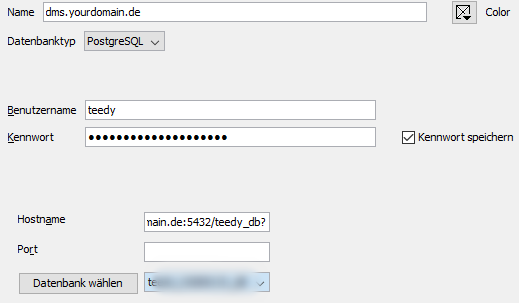](https://wiki.stadtfabrikanten.org/uploads/images/gallery/2025-05/PqkgOQfgGcRM1p2T-grafik.png)
- user: teedy
- hostname: yourdomain.de:5432/teedy\_db?
- port: stays empty
- database: teedy\_db