# Importer for Windows

- The Bulk file importer tool is based on NodeJS
- Documentation also available under [https://github.com/sismics/docs/tree/master/docs-importer](https://github.com/sismics/docs/tree/master/docs-importer)

## Download the importer


The importer can be also downloaded at Github. The most recent version to find is [https://github.com/sismics/docs/releases/download/v1.5/docs-importer-win.exe](https://github.com/sismics/docs/releases/download/v1.5/docs-importer-win.exe) (which is an old one). We can also build ourselves. See below.

## Building the importer

### Requirements

<div class="rwui_item_content" id="bkmrk-nodejs-v10.18.0-%2864-">- NodeJS v10.18.0 (64 Bit) → [https://nodejs.org/dist/v10.18.0/node-v10.18.0-win-x64.zip](https://nodejs.org/dist/v10.18.0/node-v10.18.0-win-x64.zip) - newer version will fail!
- Git → [https://git-scm.com/download/win](https://git-scm.com/download/win)

</div><p class="callout warning">Check your `%PATH%` variable. This should contain the following executables</p>

<div class="rwui_item_content" id="bkmrk-nodejs.exe-git.exe">- nodejs.exe
- git.exe

</div>### Open elevated CMD Shell

1. press CTRL + R to open "Run"
2. Enter "cmd"
3. Click ok  
    [![grafik.png](https://wiki.stadtfabrikanten.org/uploads/images/gallery/2025-05/scaled-1680-/nMFy823Mp6AK1zw7-grafik.png)](https://wiki.stadtfabrikanten.org/uploads/images/gallery/2025-05/nMFy823Mp6AK1zw7-grafik.png)
4. Start elevated shell from current cmd. This will open up a new cmd shell with admin privileges  
    [![grafik.png](https://wiki.stadtfabrikanten.org/uploads/images/gallery/2025-05/scaled-1680-/TgfxVC1R943eZfwA-grafik.png)](https://wiki.stadtfabrikanten.org/uploads/images/gallery/2025-05/TgfxVC1R943eZfwA-grafik.png)

### Clone Repository and run build

```bash
cd C:\
git clone https://github.com/sismics/docs.git
cd docs\docs-importer
npm install
npm install -g pkg
pkg .
```

[![grafik.png](https://wiki.stadtfabrikanten.org/uploads/images/gallery/2025-05/scaled-1680-/w70yXkcpxpI0Z6AL-grafik.png)](https://wiki.stadtfabrikanten.org/uploads/images/gallery/2025-05/w70yXkcpxpI0Z6AL-grafik.png)

### Check the built output

[![grafik.png](https://wiki.stadtfabrikanten.org/uploads/images/gallery/2025-05/scaled-1680-/QajGjfQVu0mH3HtR-grafik.png)](https://wiki.stadtfabrikanten.org/uploads/images/gallery/2025-05/QajGjfQVu0mH3HtR-grafik.png)

## Configure to use the importer

### Create new share upload directory

<span lang="en">A special upload folder should be created, e.g. `C:\TeedyShare` - from this folder the documents will be uploaded and **cut later**.</span>

### Start docs-importer-win.exe and configure it

Please put the docs-importer-win.exe to some fixed place where it should stay, like in `C:\Teedy\docs-importer-win.exe`

[![grafik.png](https://wiki.stadtfabrikanten.org/uploads/images/gallery/2025-05/scaled-1680-/YSMRyAvFzw1YQ3Ug-grafik.png)](https://wiki.stadtfabrikanten.org/uploads/images/gallery/2025-05/YSMRyAvFzw1YQ3Ug-grafik.png)

<p class="callout info">**N**ote that the screenshot contains some older directory name.</p>

After entering the connection data this information will be persisted in `%userprofile%\config\preferences\com.sismics.docs.importer.pref`

### Start as daemon and test upload

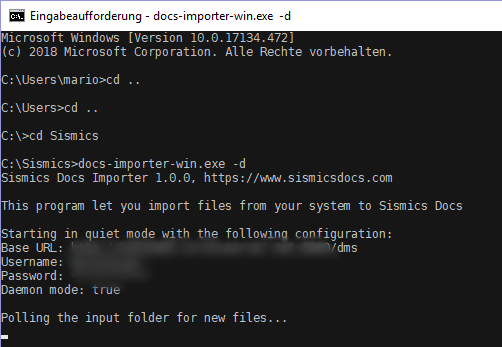
<span lang="en">The program can be started with the switch `-d`. It queries the specified folder every 30 seconds and uploads any existing documents to the DMS. The files are then deleted locally.</span>

[![grafik.png](https://wiki.stadtfabrikanten.org/uploads/images/gallery/2025-05/scaled-1680-/23K0K88bcQdw2Kkc-grafik.png)](https://wiki.stadtfabrikanten.org/uploads/images/gallery/2025-05/23K0K88bcQdw2Kkc-grafik.png)

### Install as Windows Service

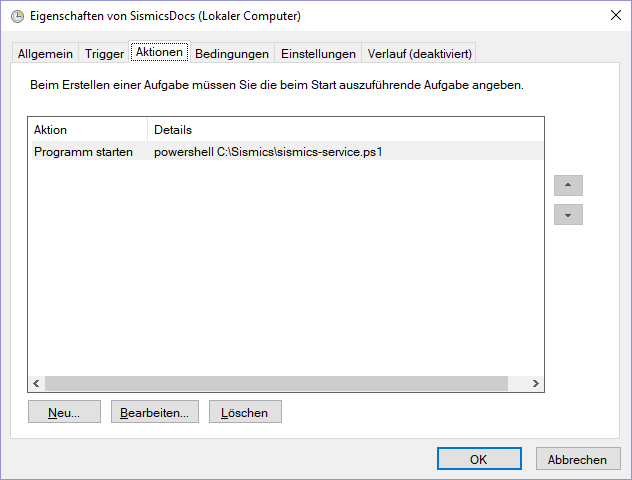
Create file `C:\Teedy\teedy-service.ps1`

```bash
Start-Process -WindowStyle hidden -FilePath C:\Teedy\docs-importer-win.exe -ArgumentList "-d"
```

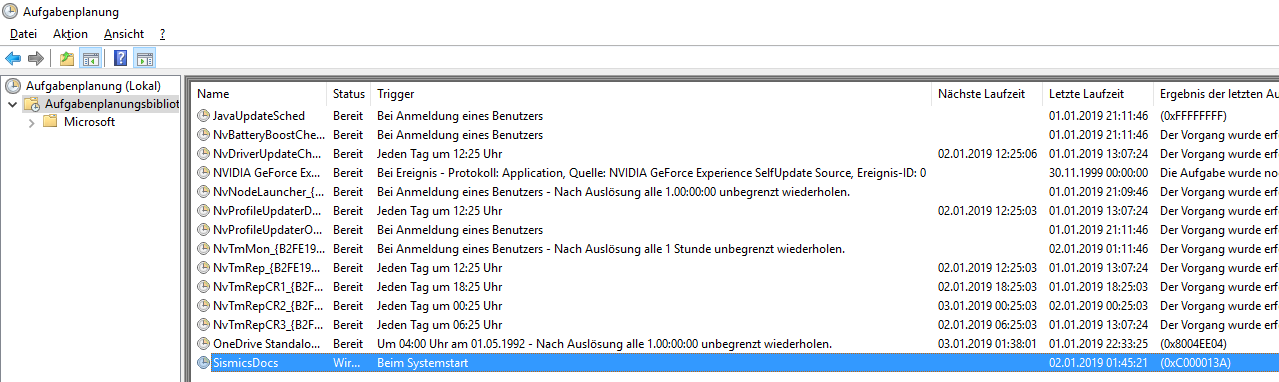
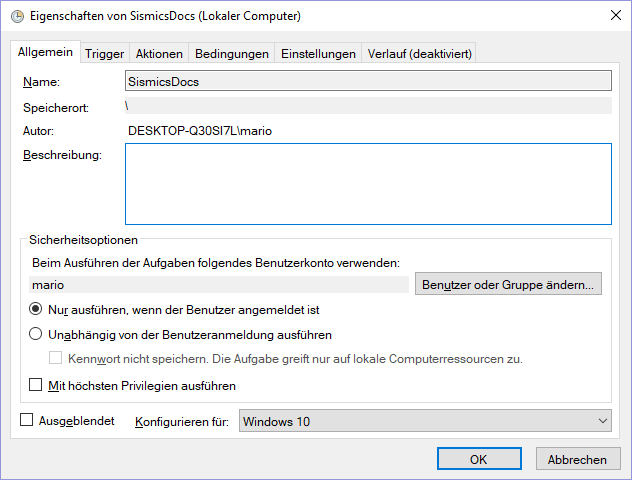
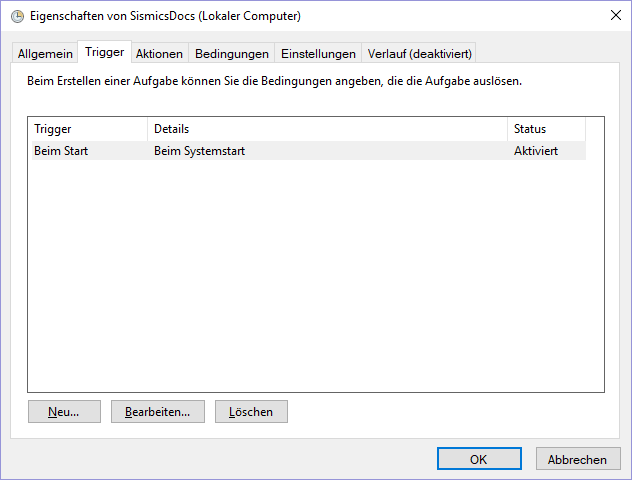
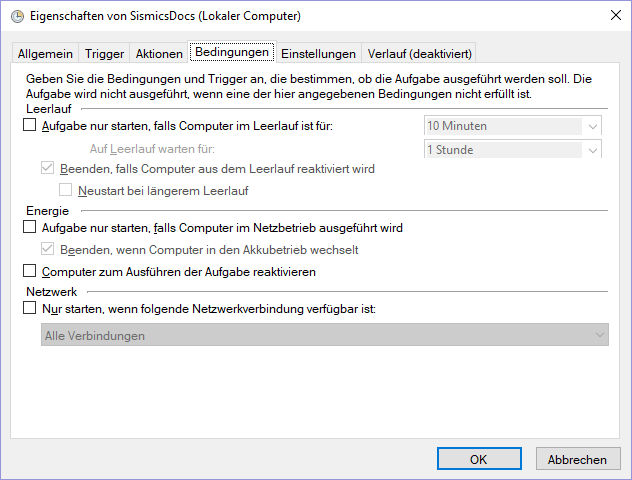
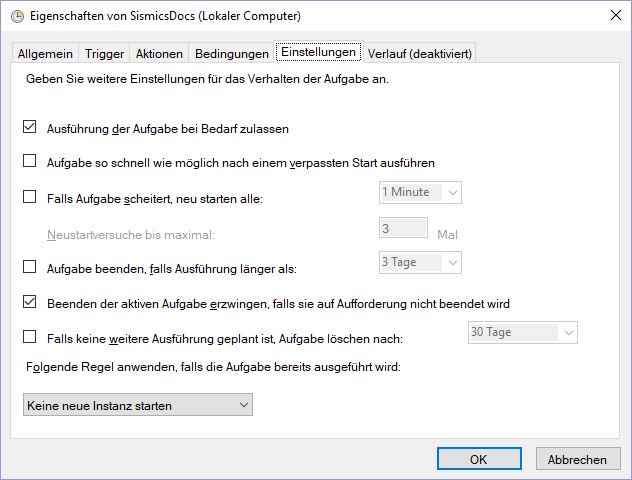
Create a new task in task scheduler

<p class="callout info">Sorry for german screenshots. And please replace "SismicsDocs" with "Teedy" everywhere.</p>

[![grafik.png](https://wiki.stadtfabrikanten.org/uploads/images/gallery/2025-05/scaled-1680-/kHu6S2fRo8qjHB6z-grafik.png)](https://wiki.stadtfabrikanten.org/uploads/images/gallery/2025-05/kHu6S2fRo8qjHB6z-grafik.png) [![grafik.png](https://wiki.stadtfabrikanten.org/uploads/images/gallery/2025-05/scaled-1680-/jesZEsrhn0D4BNqq-grafik.png)](https://wiki.stadtfabrikanten.org/uploads/images/gallery/2025-05/jesZEsrhn0D4BNqq-grafik.png) [![grafik.png](https://wiki.stadtfabrikanten.org/uploads/images/gallery/2025-05/scaled-1680-/5yJ6I3DeAqIgLH5P-grafik.png)](https://wiki.stadtfabrikanten.org/uploads/images/gallery/2025-05/5yJ6I3DeAqIgLH5P-grafik.png) [![grafik.png](https://wiki.stadtfabrikanten.org/uploads/images/gallery/2025-05/scaled-1680-/7NXRNQ3u8O6iYScE-grafik.png)](https://wiki.stadtfabrikanten.org/uploads/images/gallery/2025-05/7NXRNQ3u8O6iYScE-grafik.png) [![grafik.png](https://wiki.stadtfabrikanten.org/uploads/images/gallery/2025-05/scaled-1680-/u5qBGUwde7SEcnuV-grafik.png)](https://wiki.stadtfabrikanten.org/uploads/images/gallery/2025-05/u5qBGUwde7SEcnuV-grafik.png) [![grafik.png](https://wiki.stadtfabrikanten.org/uploads/images/gallery/2025-05/scaled-1680-/gLwsNX6JDHUxf3pr-grafik.png)](https://wiki.stadtfabrikanten.org/uploads/images/gallery/2025-05/gLwsNX6JDHUxf3pr-grafik.png) [![grafik.png](https://wiki.stadtfabrikanten.org/uploads/images/gallery/2025-05/scaled-1680-/gmXChlQkS5FPuMHI-grafik.png)](https://wiki.stadtfabrikanten.org/uploads/images/gallery/2025-05/gmXChlQkS5FPuMHI-grafik.png)
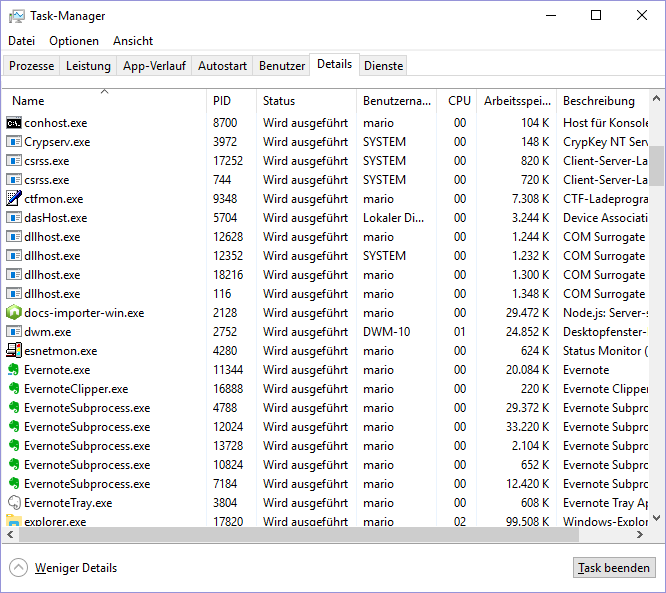
Check if service is running. Look for `docs-importer-win.exe`

[![grafik.png](https://wiki.stadtfabrikanten.org/uploads/images/gallery/2025-05/scaled-1680-/8GqOEZBqrYWsBntr-grafik.png)](https://wiki.stadtfabrikanten.org/uploads/images/gallery/2025-05/8GqOEZBqrYWsBntr-grafik.png)
Create a new Desktop Shortcut for your share directory

[![grafik.png](https://wiki.stadtfabrikanten.org/uploads/images/gallery/2025-05/scaled-1680-/mHtwqOb80bL21cir-grafik.png)](https://wiki.stadtfabrikanten.org/uploads/images/gallery/2025-05/mHtwqOb80bL21cir-grafik.png)