# Access to the H2 Database

External Database access for H2 can be granted on different ways. Teedy stores its H2 database in standard path `/var/docs/db`

## Variant 1: Download H2 Database Tool

1. Download → [<span>http://www.h2database.com/h2-2019-03-13.zip</span>](http://www.h2database.com/h2-2019-03-13.zip)  
    [![grafik.png](https://wiki.stadtfabrikanten.org/uploads/images/gallery/2025-05/scaled-1680-/vDi50q650IzkCmJD-grafik.png)](https://wiki.stadtfabrikanten.org/uploads/images/gallery/2025-05/vDi50q650IzkCmJD-grafik.png)
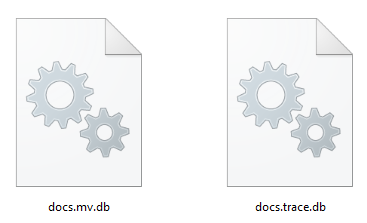
2. Put your database **copy/backup** files (docs.mv.db and dovs.trace.db) into some directory where you can access it
3. Use it

**Run the h2.bat file and connect via Web Interface, or**

[![grafik.png](https://wiki.stadtfabrikanten.org/uploads/images/gallery/2025-05/scaled-1680-/lGfsEHXAP8Xw21yv-grafik.png)](https://wiki.stadtfabrikanten.org/uploads/images/gallery/2025-05/lGfsEHXAP8Xw21yv-grafik.png)

**Connect via Console (Windows)**

```bash
cmd
cd C:\Users\mario\Downloads\h2-2019-03-13\h2\bin
#note: ignore the *.db ending. H2 will add it automatically. If you do it yourself it will fail!
java -jar h2-1.4.199.jar -url "jdbc:h2:file:~/Downloads/docs;CACHE_SIZE=65536;LOCK_TIMEOUT=10000;IFEXISTS=TRUE;" -driver "org.h2.Driver" -user "sa" -password ""
```

**Connect via Console (Linux)**

<p class="callout info">Good tips: [https://o7planning.org/en/11895/installing-h2-database-and-using-h2-console](https://o7planning.org/en/11895/installing-h2-database-and-using-h2-console)</p>

```bash
cd opt/
wget https://h2database.com/h2-2019-03-13.zip
unzip h2-2019-03-13.zip
rm h2-2019-03-13.zip
cd /opt/h2/bin/
 
#open Database with h2 driver - enable X11 forward to recieve graphical user interface (GUI)
export DISPLAY=localhost:10.0 && java -jar h2-1.4.199.jar -url "jdbc:h2:file:/var/docs.bak/db/docs;CACHE_SIZE=65536;LOCK_TIMEOUT=10000;IFEXISTS=TRUE;" -driver "org.h2.Driver" -user "sa" -password ""
 
#note that version h2-2019-10-14 failed on the Teedy H2 database. So i used older version h2-2019-03-13
```

## Variant 2: DBVisualizer

DBVisualizer comes with bundled support for H2 including the driver → [https://www.dbvis.com/features/h2-database-features](https://www.dbvis.com/features/h2-database-features/)

Some example configuration looks like this:

[![grafik.png](https://wiki.stadtfabrikanten.org/uploads/images/gallery/2025-05/scaled-1680-/xnVdgV4B0y2O2iq3-grafik.png)](https://wiki.stadtfabrikanten.org/uploads/images/gallery/2025-05/xnVdgV4B0y2O2iq3-grafik.png)
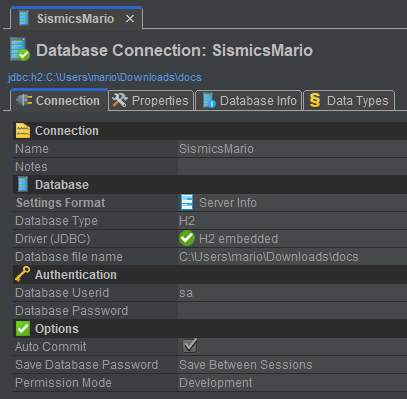
<p class="callout info">Ignore the `*.db` ending. H2 will add it automatically. If you do it yourself it will fail! So the database "docs" contains of two files and you only need to enter the principal name.</p>

[![grafik.png](https://wiki.stadtfabrikanten.org/uploads/images/gallery/2025-05/scaled-1680-/gEpfzq0vmHkqds07-grafik.png)](https://wiki.stadtfabrikanten.org/uploads/images/gallery/2025-05/gEpfzq0vmHkqds07-grafik.png)