Teedy File and Document Processing
- Check index integrity / recompute quota
- Fix Preview Bug
- Grafana Monitoring / Statistics
- Icons in document titles
- Importer for Windows
- Manually fix broken document relations in database
- Optical Character Recognition (OCR) and Scanning
- Searching and Tags
Check index integrity / recompute quota
Sometimes the used space is wrong and may look like this:

See also: https://github.com/sismics/docs/issues/345
Checks on file system
cd /var/docs/

find ./ -type f -name '*' -exec du -ch {} + | grep total$
find ./ -type f -name '*_web' -exec du -ch {} + | grep total$
find ./ -type f -name '*_thumb' -exec du -ch {} + | grep total$

cd /var/docs/storage/
ll |grep -v "thumb\|web" |wc -l #Anzahl der Dateien, die weder _web noch _thumb sind
ll | grep "web" | wc -l         #Anzahl _web Dateien (sollte idealerweise mit _thumb deckend sein)
ll | grep "thumb" | wc -l       #Anzahl _thumb Dateien (sollte idealerweise mit _web deckend sein)
Checks in Database / Recalculate Quota
Get a list of all files from database which should exist/not exist on filesystem
/*Get all files which should be existent on HDD*/
SELECT
fil_id_c AS "FileID",
fil_iduser_c AS "Besitzer"
FROM t_file
WHERE fil_deletedate_d IS NULL
;

/*Get all files which should be deteled from HDD*/
SELECT
fil_id_c AS "FileID",
fil_iduser_c AS "Besitzer"
FROM t_file
WHERE fil_deletedate_d IS NOT NULL
;
Get the filesystem storage list
The following commands generate file output and send them by mail to you. If your application server and your database are on the same server you just can create some bash script to make some complete scripting solution automating psql.
cd /var/docs/

#get recent storage list as CSV
ll | grep -v "thumb\|web" | awk 'NR > 3 {print "\"",$5,"\";\"",$9,"\""}' | sed 's/[[:blank:]]//g' | mail -s "Teedy FileSystem" your@mail.address

#or get it as SQL statement
ll | grep -v "thumb\|web" | awk 'NR > 3 {print "UPDATE#TMP_QUOTA_CHECK#SET#fil_size=\x27",$5,"\x27#WHERE#fil_id_c=\x27",$9,"\x27;"}' | sed 's/[[:blank:]]//g' | sed 's/#/ /g' | mail -s "Teedy FileSystem" your@mail.address
Create a temporary SQL table to calculate quota
CREATE TABLE TMP_QUOTA_CHECK(
    fil_id_c  character varying(36),
    fil_iduser_c  character varying(36),
    fil_size integer
);
Pre-Fill the table with existing data
INSERT INTO TMP_QUOTA_CHECK SELECT
fil_id_c,
fil_iduser_c
FROM t_file
WHERE fil_deletedate_d IS NULL
;
Insert file size data from upper generated SQL UPDATE awk statements (bash), then perform some check and calculate total quota sizes
SELECT * FROM tmp_quota_check WHERE fil_size IS NOT NULL;
SELECT * FROM tmp_quota_check WHERE fil_size IS NULL; --if your filesystem is consistent this must be empty! If not please check if Teedy failed to delete files in the past

SELECT
    CONCAT('UPDATE t_user SET use_storagecurrent_n=''',SUM(fil_size),''' WHERE use_id_c =''',fil_iduser_c,''';')
FROM TMP_QUOTA_CHECK
GROUP BY fil_iduser_c
;
Insert the new values into existing target table using the generated output statements from above
Drop temporary table
DROP TABLE TMP_QUOTA_CHECK;Removed commit
Fix Preview Bug
In case the file preview is erroneous/empty but the file can be processed and it can be downloaded by URL like https://dms.yourdomain.de/api/file/:FILE_ID/data:

Root Cause: unkown. Seems to happen after migration from H2 to PostgreSQL
Fixing proposal
Remove the _thumb and _web files
and let Teedy create new ones by running a (complete) re-processing

cd /var/docs/storage
ll | grep "<YOUR_FILE_ID>"
mv <YOUR_FILE_ID>_thumb <YOUR_FILE_ID>_thumb.bak
mv <YOUR_FILE_ID>_web <YOUR_FILE_ID>_web.bak

#or just move all stuff to some sub directory if you plan to re-process the complete file system:
mkdir thumb_web_bak
mv *_thumb *_web thumb_web_bak/

#restart your instance to let Teedy recognize that changes due to caching
sudo systemctl restart jetty9.service
Reprocess documents
See Teedy API Scripts / database queries for reprocessing of everything.
Grafana Monitoring / Statistics
Description
A Grafana monitoring dashboard for Teedy (Sismics Docs) statistics. Helpful to have a look over security things and the effort you put in your instance. Please check if this is okay for your own use - regarding privacy protection of the mates working together on the same instance. Sorry the language for that dashboard is german but you can translate it easily using tools like deepl.com.
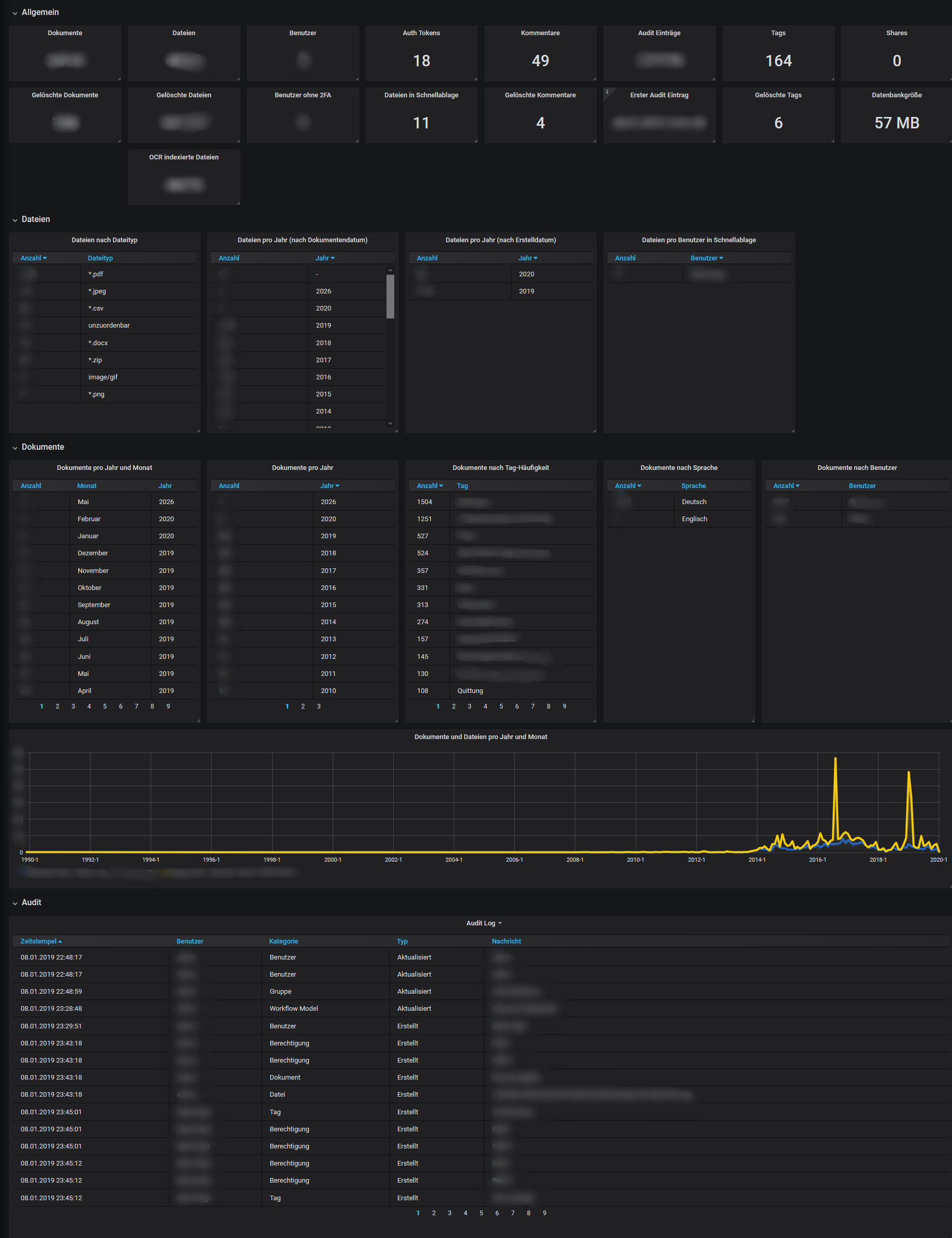
Download
- https://gitea.fablabchemnitz.de/vmario/teedy-statistics/src/branch/master
- https://grafana.com/grafana/dashboards/11556
Icons in document titles
Inside Teedy we can use funny icons, if we know the correct Unicode number.
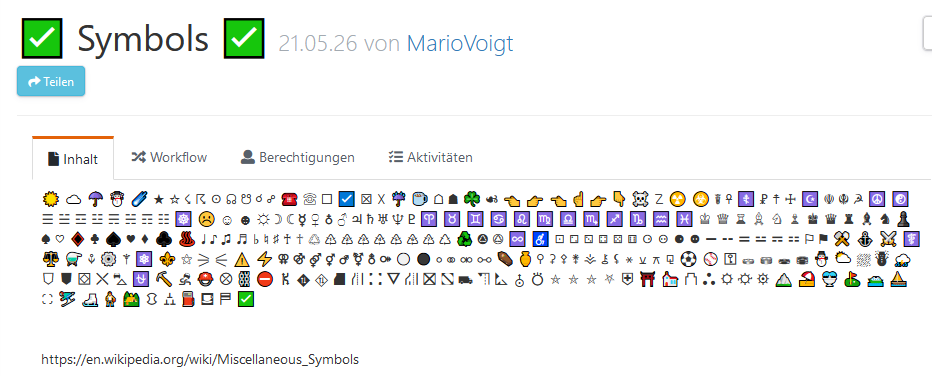
Copy + Paste. Just select the one's you need and paste them into Teedy. It works for title and description
☀ ☁ ☂ ☃ ☄ ★ ☆ ☇ ☈ ☉ ☊ ☋ ☌ ☍ ☎ ☏ ☐ ☑ ☒ ☓ ☔ ☕ ☖ ☗ ☘ ☙ ☚ ☛ ☜ ☝ ☞ ☟ ☠ ☡ ☢ ☣ ☤ ☥ ☦ ☧ ☨ ☩ ☪ ☫ ☬ ☭ ☮ ☯ ☰ ☱ ☲ ☳ ☴ ☵ ☶ ☷ ☸ ☹ ☺ ☻ ☼ ☽ ☾ ☿ ♀ ♁ ♂ ♃ ♄ ♅ ♆ ♇ ♈ ♉ ♊ ♋ ♌ ♍ ♎ ♏ ♐ ♑ ♒ ♓ ♔ ♕ ♖ ♗ ♘ ♙ ♚ ♛ ♜ ♝ ♞ ♟ ♠ ♡ ♢ ♣ ♤ ♥ ♦ ♧ ♨ ♩ ♪ ♫ ♬ ♭ ♮ ♯ ♰ ♱ ♲ ♳ ♴ ♵ ♶ ♷ ♸ ♹ ♺ ♻ ♼ ♽ ♾ ♿ ⚀ ⚁ ⚂ ⚃ ⚄ ⚅ ⚆ ⚇ ⚈ ⚉ ⚊ ⚋ ⚌ ⚍ ⚎ ⚏ ⚐ ⚑ ⚒ ⚓ ⚔ ⚕ ⚖ ⚗ ⚘ ⚙ ⚚ ⚛ ⚜ ⚝ ⚞ ⚟ ⚠ ⚡ ⚢ ⚣ ⚤ ⚥ ⚦ ⚧ ⚨ ⚩ ⚪ ⚫ ⚬ ⚭ ⚮ ⚯ ⚰ ⚱ ⚲ ⚳ ⚴ ⚵ ⚶ ⚷ ⚸ ⚹ ⚺ ⚻ ⚼ ⚽ ⚾ ⚿ ⛀ ⛁ ⛂ ⛃ ⛄ ⛅ ⛆ ⛇ ⛈ ⛉ ⛊ ⛋ ⛌ ⛍ ⛎ ⛏ ⛐ ⛑ ⛒ ⛓ ⛔ ⛕ ⛖ ⛗ ⛘ ⛙ ⛚ ⛛ ⛜ ⛝ ⛞ ⛟ ⛠ ⛡ ⛢ ⛣ ⛤ ⛥ ⛦ ⛧ ⛨ ⛩ ⛪ ⛫ ⛬ ⛭ ⛮ ⛯ ⛰ ⛱ ⛲ ⛳ ⛴ ⛵ ⛶ ⛷ ⛸ ⛹ ⛺ ⛻ ⛼ ⛽ ⛾ ⛿ ✅
https://en.wikipedia.org/wiki/Miscellaneous_Symbols
Importer for Windows
- The Bulk file importer tool is based on NodeJS
- Documentation also available under https://github.com/sismics/docs/tree/master/docs-importer
Download the importer
See Downloads for recent compiled setups. The importer can be also downloaded at Github. The most recent version to find is https://github.com/sismics/docs/releases/download/v1.5/docs-importer-win.exe (which is an old one). We can also build ourselves. See below.
Building the importer
Requirements
- NodeJS v10.18.0 (64 Bit) → https://nodejs.org/dist/v10.18.0/node-v10.18.0-win-x64.zip - newer version will fail!
- Git → https://git-scm.com/download/win
Check your %PATH% variable. This should contain the following executables
- nodejs.exe
- git.exe
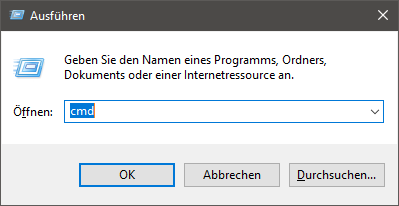
Open elevated CMD Shell
- press CTRL + R to open "Run"
- Enter "cmd"
- Click ok

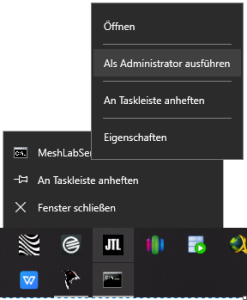
- Start elevated shell from current cmd. This will open up a new cmd shell with admin privileges

Clone Repository and run build
cd C:\
git clone https://github.com/sismics/docs.git
cd docs\docs-importer
npm install
npm install -g pkg
pkg .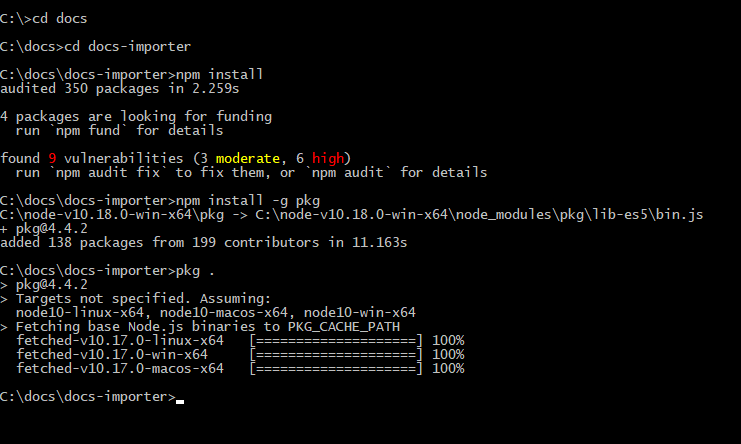
Check the built output
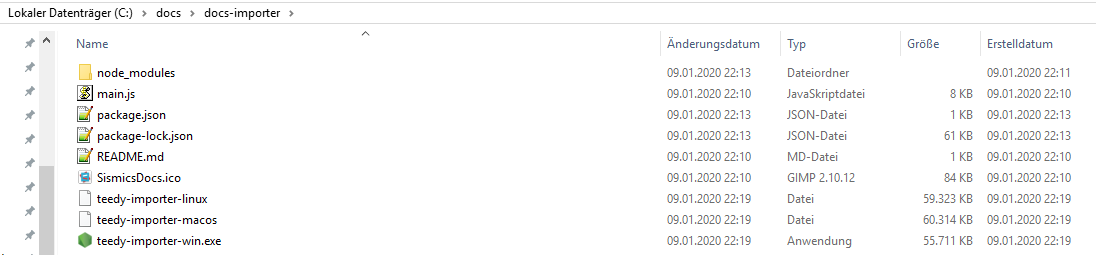
Configure to use the importer
Create new share upload directory
A special upload folder should be created, e.g. C:\TeedyShare - from this folder the documents will be uploaded and cut later.
Start docs-importer-win.exe and configure it
Please put the docs-importer-win.exe to some fixed place where it should stay, like in C:\Teedy\docs-importer-win.exe
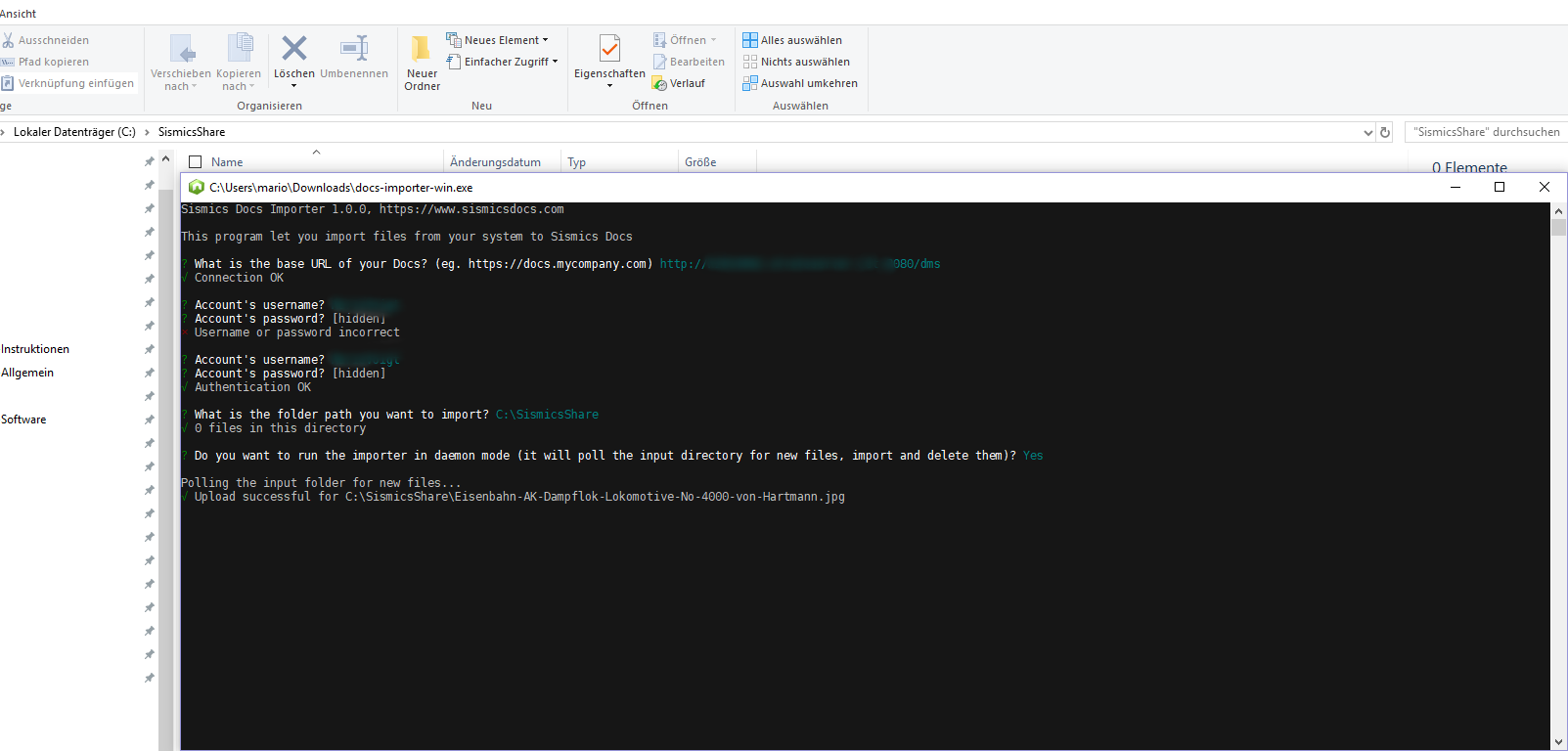
Note that the screenshot contains some older directory name.
After entering the connection data this information will be persisted in %userprofile%\config\preferences\com.sismics.docs.importer.pref
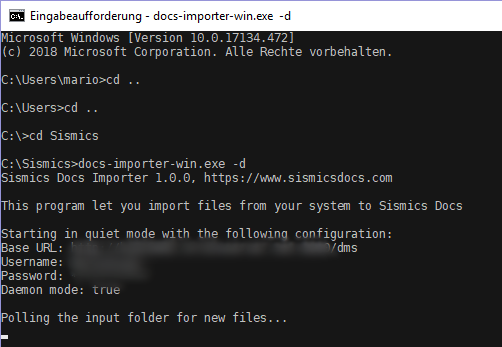
Start as daemon and test upload
The program can be started with the switch -d. It queries the specified folder every 30 seconds and uploads any existing documents to the DMS. The files are then deleted locally.
Install as Windows Service
Create file C:\Teedy\teedy-service.ps1
Start-Process -WindowStyle hidden -FilePath C:\Teedy\docs-importer-win.exe -ArgumentList "-d"Create a new task in task scheduler
Sorry for german screenshots. And please replace "SismicsDocs" with "Teedy" everywhere.
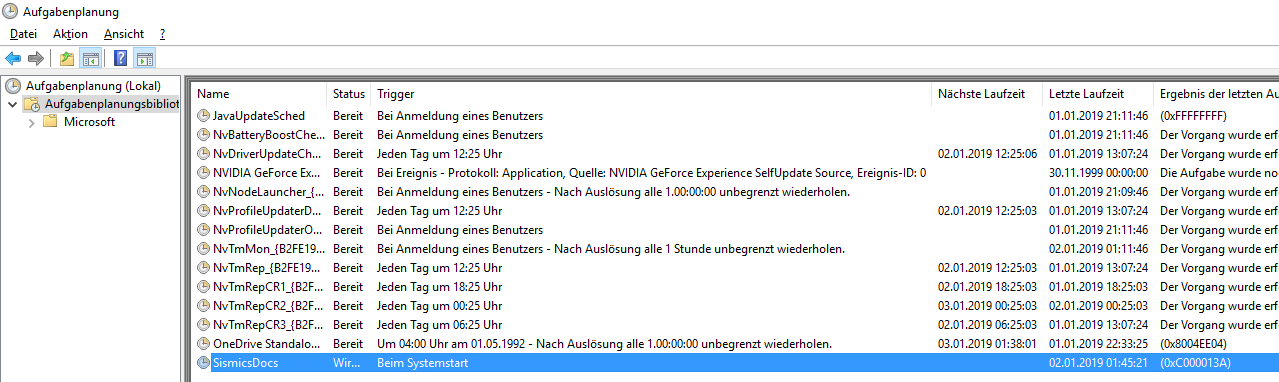
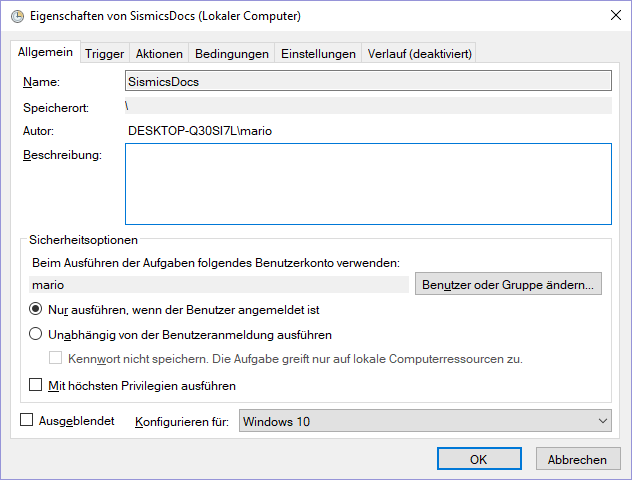
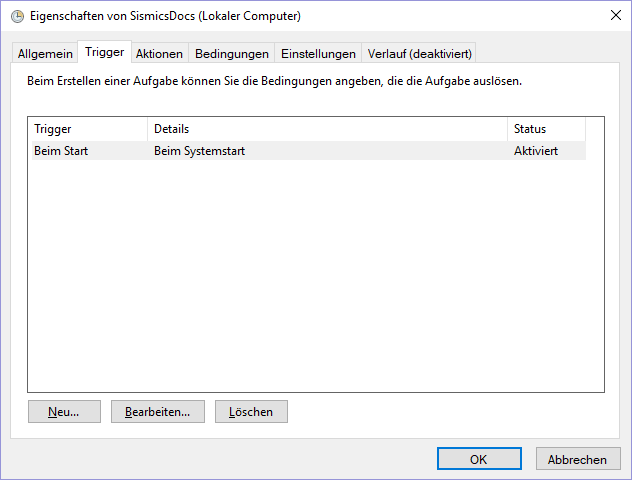
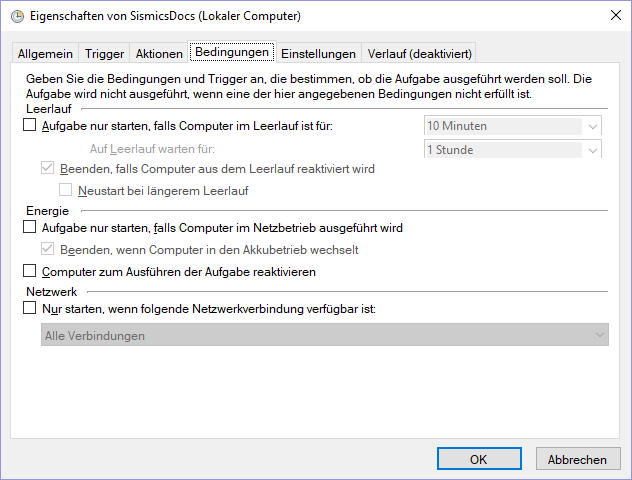
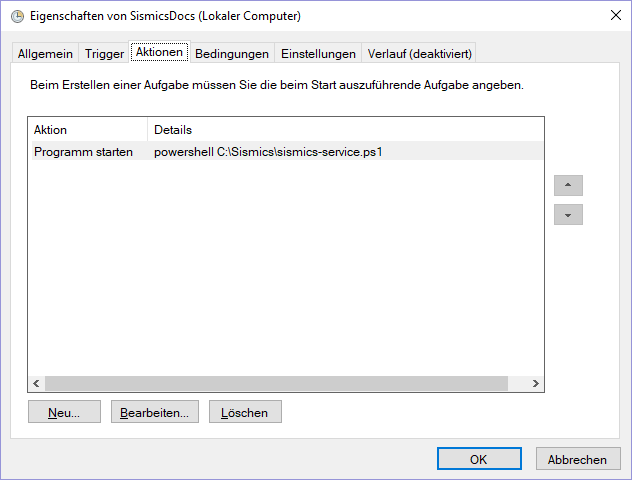
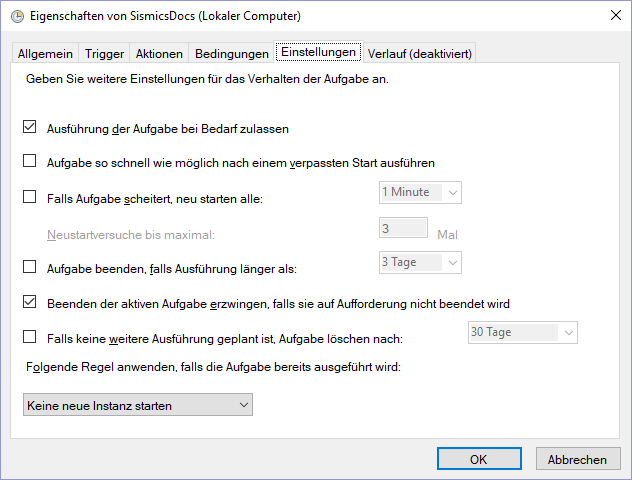
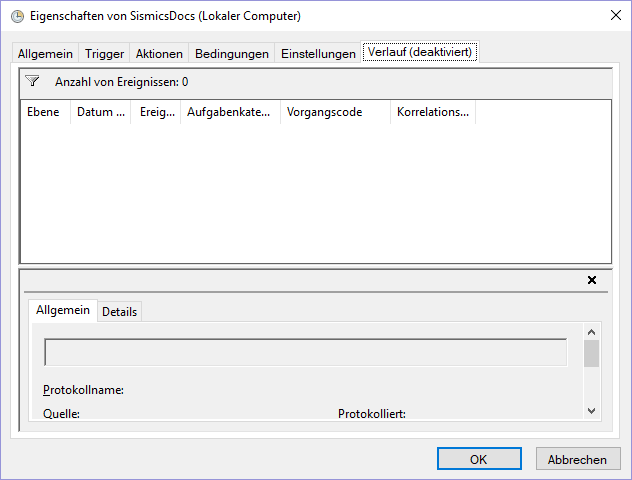
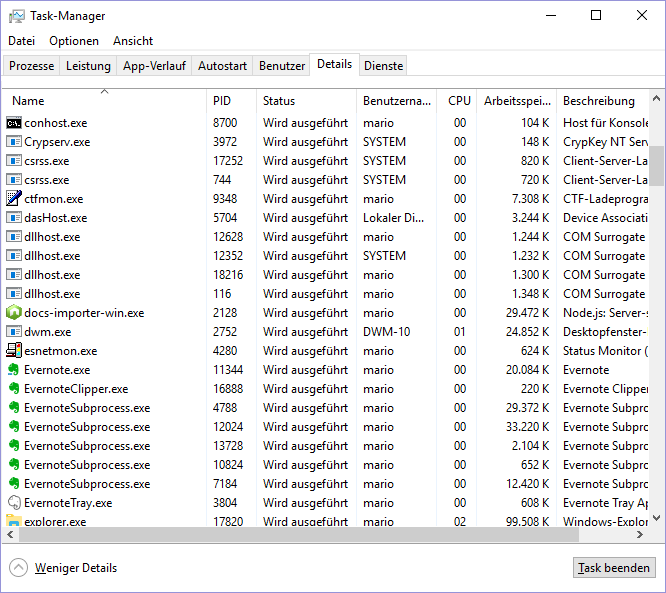
Check if service is running. Look for docs-importer-win.exe
Create a new Desktop Shortcut for your share directory

Manually fix broken document relations in database
Find documents which have relations to other documents which already were deleted
Sometimes documents link to other documents but the links are invalid because the linked document is not available anymore. We can manually reset those links only because there is no working mechanism yet.
Get all relations with their id's
SELECT
    R.rel_id_c,
    F.doc_title_c "From",
    T.doc_title_c "To"
FROM
    t_relation AS R
JOIN t_document AS T ON R.rel_iddocfrom_c = T.doc_id_c
JOIN t_document AS F ON R.rel_iddocto_c = F.doc_id_c
WHERE
    R.rel_deletedate_d IS NULL AND
    T.doc_deletedate_d IS NOT NULL AND
    F.doc_deletedate_d IS NULL

UNION

SELECT
    R.rel_id_c,
    T.doc_title_c "From",
    F.doc_title_c "To"
FROM
    t_relation AS R
JOIN t_document AS T ON R.rel_iddocfrom_c = T.doc_id_c
JOIN t_document AS F ON R.rel_iddocto_c = F.doc_id_c
WHERE
    R.rel_deletedate_d IS NULL AND
    T.doc_deletedate_d IS NULL AND
    F.doc_deletedate_d IS NOT NULL

ORDER BY "From"
;
Now we just set the delete flag of the relation to a date not NULL so it will unshow in Teedy visually. That will remove invalid links.
update t_relation SET rel_deletedate_d = NOW() WHERE rel_id_c IN ('your relation id 1', 'your relation id 2', .. , 'your relation id n');
Optical Character Recognition (OCR) and Scanning
Handling
OCR data is stored in Teedy database table t_file which containts the string column fil_content_c. In H2 the data is stored als plaintext string. In PostgreSQL the column is filled as datatype ::text. A normal select returns number. The unecrypted OCR text data can be accessed from the large object by using some SQL statement like
select
fil_name_c,
convert_from(loread(lo_open(fil_content_c::int, 131072), 999999999), 'UTF8')
from t_file WHERE fil_deletedate_d IS NULL AND fil_content_c IS NOT NULL limit 1;
Teedy uses a built in process runner to start the binary tesseract with a language parameter. This works if "tesseract" is contained in $PATH (Linux) or %PATH% (Windows) environment variable.
Fixing faulty fil_content_c data the easy way
Some quick fix for issue described in https://github.com/sismics/docs/issues/451
SELECT fil_content_c FROM t_file
WHERE  LENGTH(fil_content_c) > 6
ORDER BY fil_createdate_d DESC;

UPDATE t_file SET fil_content_c = NULL
WHERE  LENGTH(fil_content_c) > 6;
Converting LOB data to plain text (was required at some point from updating Teedy 1.8 to Teedy 1.9)
/*
Show items which start with useless linefeeds. We need to correct those because otherwise we cannot continue with following statements (casting "fil_content_c::int" will fail and other issues)
Result may be empty
*/
SELECT
    fil_id_c,
    fil_name_c,
    fil_content_c
FROM t_file
WHERE
    fil_content_c LIKE E'%\n'
;

/*Trim beginning linefeeds (only) away*/
UPDATE t_file SET fil_content_c = TRIM(e'\n' FROM fil_content_c)
WHERE
    fil_content_c LIKE E'%\n'
;

/*
Show faulty data which would return "invalid byte sequence for encoding "UTF8": 0x00" or similar.
First we build some function to check for valid UTF8 bytea because sometimes we have faulty stuff inside DB
Result may be empty
*/
CREATE FUNCTION is_valid_utf8(bytea) RETURNS boolean
   LANGUAGE plpgsql AS
$$BEGIN
   PERFORM convert_from($1, 'UTF8');
   RETURN TRUE;
EXCEPTION
   WHEN character_not_in_repertoire THEN
      RAISE WARNING '%', SQLERRM;
      RETURN FALSE;
END;$$;
SELECT
    fil_id_c,
    fil_name_c,
    loread(lo_open(fil_content_c::int, CAST( x'20000' AS integer)), 999999999) AS BYTE_DATA,
    LENGTH(loread(lo_open(fil_content_c::int, CAST(x'20000' AS integer)), 999999999)) AS LEN
FROM t_file
WHERE
    fil_content_c IS NOT NULL AND
    fil_content_c != '' AND
    LENGTH(fil_content_c) <= 6 AND
    is_valid_utf8(fil_content_c::bytea) IS FALSE
;

/*We set NULL to all items with faulty UTF-8 encoding (if there were some from previous statement)*/
UPDATE t_file SET fil_content_c = NULL
WHERE
    fil_content_c IS NOT NULL AND
    fil_content_c != '' AND
    LENGTH(fil_content_c) <= 6 AND
    is_valid_utf8(fil_content_c::bytea) IS FALSE
;

/*
Select OCR content which is in LOB format (Large Object) and valid UTF-8
*/
SELECT
    fil_id_c,
    fil_name_c,
    fil_content_c,
    fil_content_c::bytea, /*shows "invisible" data which does not trigger NULL or ''*/
    loread(lo_open(fil_content_c::int, CAST( x'20000' AS integer)), 999999999) AS BYTE_DATA,
     /*we use the encoding we used to create the database. See setup instructions. Usually this is "UNICODE" or "UTF8"*/
    LENGTH(loread(lo_open(fil_content_c::int, CAST(x'20000' AS integer)), 999999999)) AS LEN,
    convert_from(loread(lo_open(fil_content_c::int, CAST(x'20000' AS integer)), 999999999), 'UNICODE') as "fil_content_c"
FROM t_file
WHERE
    fil_content_c IS NOT NULL AND
    fil_content_c != '' AND
    LENGTH(fil_content_c) <= 6 AND
    is_valid_utf8(fil_content_c::bytea) IS TRUE
ORDER BY LEN ASC
;

/*Convert LOB data into plain text. First we do it for a custom selected file with fil_id_c*/
UPDATE t_file SET fil_content_c = convert_from(loread(lo_open(fil_content_c::int, CAST( x'20000' AS integer)), 999999999), 'UNICODE')::TEXT
WHERE
    fil_id_c = '13411bb0-12fd-4e25-b483-2e2d18b344ed'
;

/*Check the conversion value*/
SELECT
    fil_id_c,
    fil_name_c,
    fil_content_c
FROM t_file
WHERE
    fil_id_c = '13411bb0-12fd-4e25-b483-2e2d18b344ed'
;

/*
Now we do mass processing for LOB to plain text
DO NOT CONTINUE WITH OTHER STATEMENTS IF THIS ONE FAILS AND CHECK THE UPPER ONES AGAIN
*/
UPDATE t_file SET fil_content_c = convert_from(loread(lo_open(fil_content_c::int, CAST( x'20000' AS integer)), 999999999), 'UNICODE')::TEXT
WHERE
    fil_content_c IS NOT NULL AND
    fil_content_c != '' AND
    LENGTH(fil_content_c) <= 6 AND
    is_valid_utf8(fil_content_c::bytea) IS TRUE
;

/*We fix again useless linefeeds by trimming*/
UPDATE t_file SET fil_content_c = TRIM(e'\n' FROM fil_content_c)
WHERE
    fil_content_c LIKE E'%\n'
;

/*
Now that we converted all the LOB stuff we do mass processing for remaining stuff with length lesser than 6 chars because those OCR values are just crap
WARNING: DO NOT RUN THIS BEFORE CONVERTING BECAUSE YOU WILL OVERWRITE. IF YOU DID YOU WILL NEED TO REPROCESS ALL DOCUMENTS!
*/
UPDATE t_file SET fil_content_c = NULL
WHERE
    fil_content_c IS NOT NULL AND
    fil_content_c != '' AND
    LENGTH(fil_content_c) <= 6
;

/*Finally we check again the values visually*/
SELECT
    fil_id_c,
    fil_name_c,
    fil_content_c
FROM t_file

/*Finally re-run the indexing from background UI web interface or API to have a good search index again*/
Tesseract OCR command line binary
The installation of tesseract is simple. Note that for different operating system versions there are different tesseract versions. All tesseract versions work different in their speed and quality. We figured out that tesseract 3 on Ubuntu 16 works much faster than tesseract 4 on Ubuntu 18.
https://github.com/tesseract-ocr/tesseract/wiki
Installation
For Linux users:
#install regular version
sudo apt install tesseract-ocr tesseract-ocr-deu #will install the most recent version belonging to your OS. So older system you might get older tesseract

#install devel version. See https://launchpad.net/~alex-p/+archive/ubuntu/tesseract-ocr-devel
sudo add-apt-repository ppa:alex-p/tesseract-ocr-devel sudo apt-get update
sudo apt install tesseract-ocr tesseract-ocr-deu #add your desired languages here
For Windows users:
https://github.com/tesseract-ocr/tesseract/wiki/4.0-with-LSTM#4x-for-windows
Critical optimization
https://github.com/tesseract-ocr/tesseract/issues/2611
Some users said that disabling multiprocessing in tesseract fixes speed problems. Therefore some environment flag should be set using export. See also Environment Configuration
export OMP_THREAD_LIMIT=1Scanner Apps for Smartphones
There are a LOT of scanner apps in PlayStore. Most of them have nearly same naming. The following list is only a minimalistic overview of stuff around the web. Mainly we are looking for open source applications.
Wishes
- automatic upload to or sending by mail
- problem: what if you use multiple instances of DMS? Then you will need multiple upload locations. All known app do not deal with that feature. With app cloning the scanner app could be multiplied so each Scanner app instance has its own configuration. Then the scanner app cand send to the correct inbox per DMS instance
Searching and Tags
Tags
Search operators
| Operator | values | Explanation |
| by: | String | The creator of the document |
| tag: | String | document with given tag |
| !tag: | String | document without given tag |
| before: | date (allowed formats: yyyy or yyyy-MM or yyyy-MM-dd) | created before date |
| ubefore: | date (allowed formats: yyyy or yyyy-MM or yyyy-MM-dd) | edited before date |
| after: | date (allowed formats: yyyy or yyyy-MM or yyyy-MM-dd) | created after date |
| uafter: | date (allowed formats: yyyy or yyyy-MM or yyyy-MM-dd) | edited after date |
| at: | date (allowed formats: yyyy or yyyy-MM or yyyy-MM-dd) | created at date |
| uat: | date (allowed formats: yyyy or yyyy-MM or yyyy-MM-dd) | edited at date |
| lang: | "eng", "fra", "ita", "deu", "spa", "por", "pol", "rus", "ukr", "ara", "hin", "chi_sim", "chi_tra", "jpn", "tha", "kor", "nld", "tur", "heb" | language |
| mime: |
does not work yet!
|
|
| shared: | yes, no | |
| workflow: | "me", String | |
| full: | String |
Use OCR full-text search (files must have been processed with Tesseract!) - full search is default since Teedy 1.9 |
| simple: | String | Performs simple search instead full search (ignores OCR) |
| * |
Wildcard only possible at the end of the search input string. Not allowed before or in a word |
|
| | |
Pipe operator. Use this to filter things like "or". Example
|
|
| "<string>" |
phrases can be put into quotes. This will return a more exact result. For example:
|
The operators ?, NOT, AND, OR are not possible - they do nothing. Lucene Core Dokumentation → Most operators unfortunately don't work in Teedy.
All other things which cannot be expressed by the given search parameters can be scripted by SQL queries for H2 or PSQL database instead. You will need to have according access to do this.
You can find a lot of useful SQL statement for filtering out your DMS in our Grafana Dashboard → Grafana Monitoring / Statistics
Example scheme for document title for things like invocies
<YYYY>\<MM> - <creditor> <type> <document number> [#<index>]
Search Filter - Combination from words, tags and other operators
Example: find documents which are tagged by invoice and company and which have "01" and "2018" in their title
tag:company tag:invoice 2018 01