# Split All

Split all paths into their constituent segments. This command may be used together with linemerge for cases such as densely-connected meshes where the latter cannot optimize well enough by itself. This command will filter out segments with identical end-points. Note that since some paths (especially curved ones) can be made of a large number of segments, this command may significantly increase the processing time of the pipeline.

<p class="callout info">The inverted function is [Line Merging (Combine Paths)](https://wiki.stadtfabrikanten.org/books/fablab-chemnitz/page/line-merging-combine-paths "Line Merging (Combine Paths)")</p>

<p class="callout warning">Split All extension might be really slow on large documents. Maybe you can go get some coffee while it performs.</p>

## Create some paths

[![grafik.png](https://wiki.stadtfabrikanten.org/uploads/images/gallery/2025-05/scaled-1680-/Lm4t6Ym4pk8rJEiQ-grafik.png)](https://wiki.stadtfabrikanten.org/uploads/images/gallery/2025-05/Lm4t6Ym4pk8rJEiQ-grafik.png)

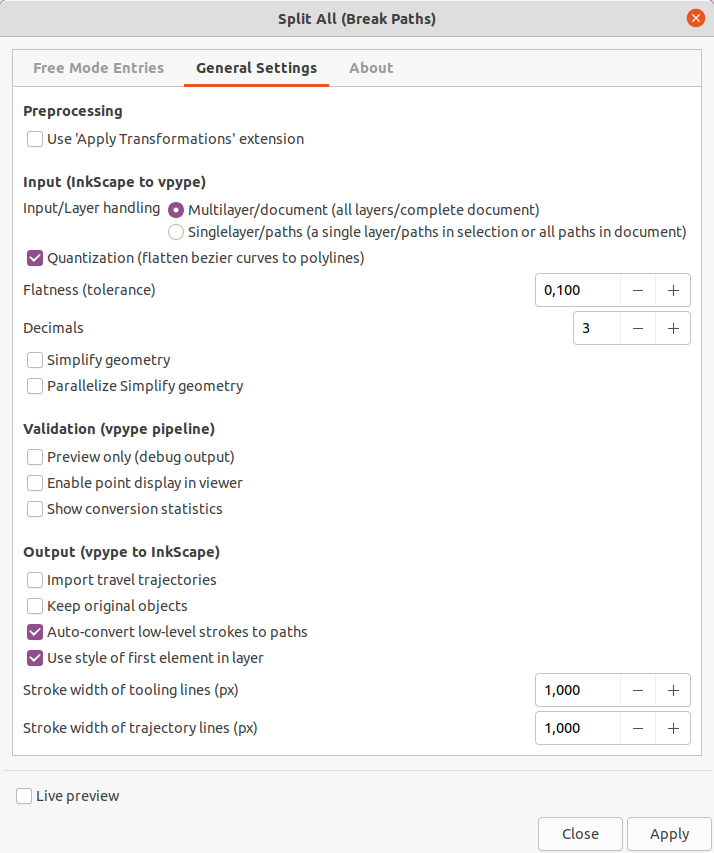
## Run the extension

[![grafik.png](https://wiki.stadtfabrikanten.org/uploads/images/gallery/2025-05/scaled-1680-/EpnQ0aXItv5GmxuM-grafik.png)](https://wiki.stadtfabrikanten.org/uploads/images/gallery/2025-05/EpnQ0aXItv5GmxuM-grafik.png)
## Get the result

We can move all lines separately now, like this:

[![grafik.png](https://wiki.stadtfabrikanten.org/uploads/images/gallery/2025-05/scaled-1680-/N9vYLtM419i4LJkF-grafik.png)](https://wiki.stadtfabrikanten.org/uploads/images/gallery/2025-05/N9vYLtM419i4LJkF-grafik.png)