# Animation

# Animate Order

Create animated SVG preview file and show it in browser. Helps to quickly evaluate line order for cutting processes. Only applies for the complete Inkscape document.

<iframe allowfullscreen="allowfullscreen" frameborder="0" height="315" sandbox="allow-same-origin allow-scripts allow-popups" src="https://videos.stadtfabrikanten.org/videos/embed/cb6ab83b-e598-4038-9434-8269357bdf95?loop=1&autoplay=1" width="560"></iframe>

<iframe allowfullscreen="allowfullscreen" frameborder="0" height="315" sandbox="allow-same-origin allow-scripts allow-popups" src="https://videos.stadtfabrikanten.org/videos/embed/6768c45a-1c39-4fd9-a016-e6b0d140dc37?loop=1&autoplay=1" width="560"></iframe>

## Tips

- Do **not** use "-inkscape-stroke:hairline" attribute for your paths. It will not render. Your page might be blank!
- If multiple paths are animated simultaneously, break apart paths into sub paths. **Each sub path will start a new animation in parallel.**
- **start your browser indepently from Inkscape before running this extension**. Each call we open a new browser tab then. If your browser is closed initially, the Inkscape extension will call a new process window, but Inkscape is blocked until browser is closed again.

## Config / Troubleshooting

### Browser in path

Select your desired browser (must be installed and must exist in %PATH% variable). If this is not the case, configure it:

**Windows (Systemsteuerung\\Alle Systemsteuerungselemente\\System → Umgebungsvariablen)**

### Firefox adjustments

If SVG does not animate, check if file access is enabled

Visit **about:config** → set "**privacy.file\_unique\_origin**" to "**false**"

### Still no animation?

- break apart paths to sub paths
- Raise duration time to larger value

## More Info

- [https://github.com/maxwellito/vivus](https://github.com/maxwellito/vivus)
- [https://github.com/maxwellito/vivus-instant](https://github.com/maxwellito/vivus-instant)
- h[ttp://maxwellito.github.io/vivus](http://maxwellito.github.io/vivus/)
- [https://maxwellito.github.io/vivus-instan](https://maxwellito.github.io/vivus-instant/)t

See also [Line Animator](https://wiki.stadtfabrikanten.org/books/fablab-chemnitz/page/line-animator "Line Animator")

```
C:\Program Files\Mozilla Firefox\
```

## Convert animated SVG to Videos/GIFs

There are a lot of tools on the net but most do not work properly. Best is to use a screen capturing tool like [https://wiki.ubuntuusers.de/Kazam](https://wiki.ubuntuusers.de/Kazam/) to capture. This video can be converted to animated gif afterwards.

Install Kazam on Fedora:

```bash
sudo dnf install keybinder
sudo dnf install python3-xlib
wget https://raw.githubusercontent.com/rpmsphere/noarch/master/k/kazam-1.5.3-1.1.noarch.rpm
sudo rpm -Uvh kazam-1.5.3-1.1.noarch.rpm
```

<div class="code panel pdl conf-macro output-block" data-hasbody="true" data-macro-name="code" id="bkmrk--1" style="border-width: 1px;"><div class="codeContent panelContent pdl"><div><div class="syntaxhighlighter sh-confluence nogutter  java" id="bkmrk--2"></div></div></div></div>Install Kazam on Ubuntu:

```bash
sudo apt install kazam
```

# Frame Animation Sequence

Source: [https://github.com/yttiktak/inkscape\_extension\_animate](https://github.com/yttiktak/inkscape_extension_animate)

Create svg path animation from frames: Place each frame of the animation in a layer named 'frame'. Each of these layers should have the same number of paths, and each path should have the same number of points as the corresponding path in other layers. The animation is applied to the paths in the first layer in the sequence, so the properties of that layer are used. Animations with different numbers of frames can be put into different sequences, named 'sequence', using sub-groups:

## Layers structure example

```ini
 not_animated_layer1
 sequence
  frame
   path1a
   path2a
  frame
   path1b
   path2b
  frame
   path1c
   path2c
  frame
   path1d
   path2d
 sequence
  frame
  frame
  frame 
```

<p class="callout warning">Use layer named exactly 'frame' and groups named exactly 'sequence', not, eg, frame1 frame2 frame3 !</p>

## SVG Example

The svg:animate elements were created using this extension

```xml
<?xml version="1.0" encoding="UTF-8" standalone="no"?>
<!-- Created with Inkscape (http://www.inkscape.org/) -->
 
<svg
   sodipodi:docname="test.svg"
   inkscape:version="1.1 (c68e22c387, 2021-05-23)"
   id="svg5"
   version="1.1"
   viewBox="0 0 196.29599 203.26439"
   height="203.26439mm"
   width="196.29599mm"
   xmlns:inkscape="http://www.inkscape.org/namespaces/inkscape"
   xmlns:sodipodi="http://sodipodi.sourceforge.net/DTD/sodipodi-0.dtd"
   xmlns="http://www.w3.org/2000/svg"
   xmlns:svg="http://www.w3.org/2000/svg">
  <sodipodi:namedview
     id="namedview7"
     pagecolor="#ffffff"
     bordercolor="#666666"
     borderopacity="1.0"
     inkscape:pageshadow="2"
     inkscape:pageopacity="0.0"
     inkscape:pagecheckerboard="0"
     inkscape:document-units="mm"
     showgrid="false"
     inkscape:zoom="0.63250561"
     inkscape:cx="222.92292"
     inkscape:cy="560.46934"
     inkscape:window-width="1920"
     inkscape:window-height="1011"
     inkscape:window-x="0"
     inkscape:window-y="0"
     inkscape:window-maximized="1"
     inkscape:current-layer="3" />
  <defs
     id="defs2" />
  <g
     inkscape:label="sequence"
     inkscape:groupmode="layer"
     id="sequence"
     transform="translate(-13.540733,-0.43540987)">
    <g
       inkscape:groupmode="layer"
       id="1"
       inkscape:label="frame">
      <path
         style="fill:none;stroke:#000000;stroke-width:0.264583px;stroke-linecap:butt;stroke-linejoin:miter;stroke-opacity:1"
         d="m 53.238722,112.56222 c -0.427144,2.82588 -39.597237,48.85805 -39.597237,48.85805"
         id="path1a">
        <animate
           attributeName="d"
           attributeType="XML"
           begin="0"
           dur="9.1"
           repeatCount="indefinite"
           values="m 53.238722,112.56222 c -0.427144,2.82588 -39.597237,48.85805 -39.597237,48.85805;
M 90.991176,37.047614 C 90.564032,39.873491 51.393939,85.905662 51.393939,85.905662" />
      </path>
      <path
         style="fill:none;stroke:#000000;stroke-width:0.264583px;stroke-linecap:butt;stroke-linejoin:miter;stroke-opacity:1"
         d="m 58.62681,152.54616 24.761296,51.09595"
         id="path2a">
        <animate
           attributeName="d"
           attributeType="XML"
           begin="0"
           dur="9.1"
           repeatCount="indefinite"
           values="m 58.62681,152.54616 24.761296,51.09595;
M 96.379264,77.031553 121.14056,128.1275" />
      </path>
    </g>
    <g
       inkscape:groupmode="layer"
       id="2"
       inkscape:label="frame">
      <path
         style="fill:none;stroke:#000000;stroke-width:0.264583px;stroke-linecap:butt;stroke-linejoin:miter;stroke-opacity:1"
         d="M 90.991176,37.047614 C 90.564032,39.873491 51.393939,85.905662 51.393939,85.905662"
         id="path1b" />
      <path
         style="fill:none;stroke:#000000;stroke-width:0.264583px;stroke-linecap:butt;stroke-linejoin:miter;stroke-opacity:1"
         d="M 96.379264,77.031553 121.14056,128.1275"
         id="path2b" />
      <g
         id="3"
         inkscape:groupmode="layer"
         inkscape:label="frame">
        <path
           style="fill:none;stroke:#000000;stroke-width:0.264583px;stroke-linecap:butt;stroke-linejoin:miter;stroke-opacity:1"
           d="M 179.5683,0.455182 C 179.14115,3.281059 139.97106,49.31323 139.97106,49.31323"
           id="path1c" />
        <path
           style="fill:none;stroke:#000000;stroke-width:0.264583px;stroke-linecap:butt;stroke-linejoin:miter;stroke-opacity:1"
           d="m 184.95639,40.439121 24.76129,51.095947"
           id="path2c" />
      </g>
    </g>
  </g>
</svg>
```

Visual Output:

<iframe allowfullscreen="allowfullscreen" frameborder="0" height="315" sandbox="allow-same-origin allow-scripts allow-popups allow-forms" src="https://videos.stadtfabrikanten.org/videos/embed/wFrd9Hi1wDeW4GRDTXg2WC" title="Frame Animation Sequence" width="560"></iframe>

# Line Animator

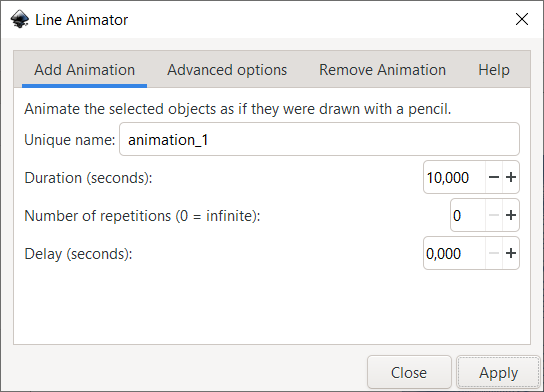
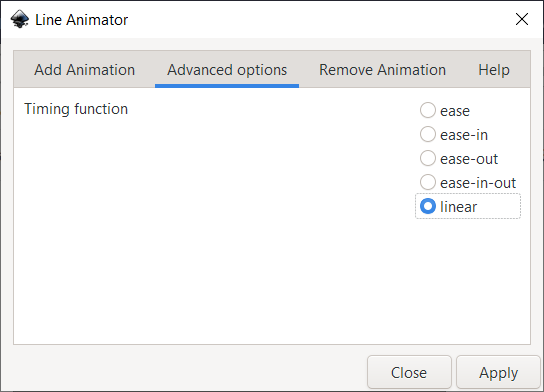
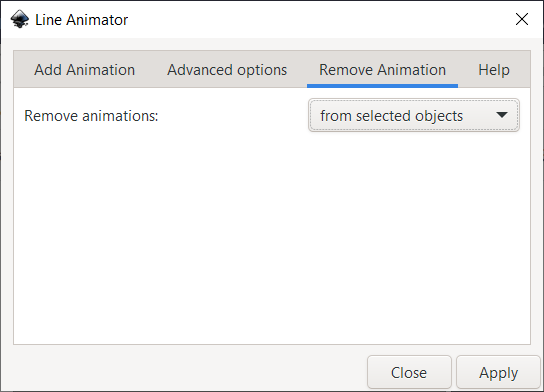
Inkscape extension for animating paths, so it looks as if they were being drawn by hand, using CSS3 animations.

Source: [<span>https://gitlab.com/Moini/ink\_line\_animator</span>](https://gitlab.com/Moini/ink_line_animator)

[![grafik.png](https://wiki.stadtfabrikanten.org/uploads/images/gallery/2025-05/scaled-1680-/pZzzlom63CbdF8Pc-grafik.png)](https://wiki.stadtfabrikanten.org/uploads/images/gallery/2025-05/pZzzlom63CbdF8Pc-grafik.png) [![grafik.png](https://wiki.stadtfabrikanten.org/uploads/images/gallery/2025-05/scaled-1680-/Wfhj8YrxK2Tx246A-grafik.png)](https://wiki.stadtfabrikanten.org/uploads/images/gallery/2025-05/Wfhj8YrxK2Tx246A-grafik.png) [![grafik.png](https://wiki.stadtfabrikanten.org/uploads/images/gallery/2025-05/scaled-1680-/euJzbP5VHTCQFVsU-grafik.png)](https://wiki.stadtfabrikanten.org/uploads/images/gallery/2025-05/euJzbP5VHTCQFVsU-grafik.png)
# Example

<iframe allowfullscreen="allowfullscreen" frameborder="0" height="315" sandbox="allow-same-origin allow-scripts allow-popups allow-forms" src="https://videos.stadtfabrikanten.org/videos/embed/iw1y84UtASaWkwjZG6p3cM" title="Line Animator Extension Example" width="560"></iframe>

See also [Animate Order](https://wiki.stadtfabrikanten.org/books/fablab-chemnitz/page/animate-order "Animate Order")