# Anleitung zum Schneidplotten

[![grafik.png](https://wiki.stadtfabrikanten.org/uploads/images/gallery/2025-10/scaled-1680-/dejifLTzKJ8896si-grafik.png)](https://wiki.stadtfabrikanten.org/uploads/images/gallery/2025-10/dejifLTzKJ8896si-grafik.png)

## Plotterbeispiele

[![grafik.png](https://wiki.stadtfabrikanten.org/uploads/images/gallery/2025-09/scaled-1680-/80UUdoEUN41riBRk-grafik.png)](https://wiki.stadtfabrikanten.org/uploads/images/gallery/2025-09/80UUdoEUN41riBRk-grafik.png) [![grafik.png](https://wiki.stadtfabrikanten.org/uploads/images/gallery/2025-10/scaled-1680-/WP1I1CpC1B5XuTlY-grafik.png)](https://wiki.stadtfabrikanten.org/uploads/images/gallery/2025-10/WP1I1CpC1B5XuTlY-grafik.png)

## Der Plotter in Aktion

<iframe allowfullscreen="allowfullscreen" frameborder="0" height="315" sandbox="allow-same-origin allow-scripts allow-popups allow-forms" src="https://videos.stadtfabrikanten.org/videos/embed/5qcnncLMHLot3GNBKJMfmN" title="Roland Vinylcutter CAMM-1 PNC-950" width="560"></iframe>

## Bedienungsanleitung und Gerätefotos → [things.fablabchemnitz.de](https://things.fablabchemnitz.de/#/document/view/cac7d29a-ce53-4679-85c9-1920dc8b40d8/content)

## Benutzung im FabLab

Der Plotter kann als Stift- oder Schneidplotter via [Inkcut](https://wiki.stadtfabrikanten.org/books/equipment/page/usb-anschluss-und-inkcut-setup "USB-Anschluss und Inkcut Setup") verwendet werden.

<div class="rwui_steps conf-macro output-block" data-hasbody="true" data-macro-name="ui-steps" id="bkmrk--4"></div>### Papier/Plottmedium einspannen

[![grafik.png](https://wiki.stadtfabrikanten.org/uploads/images/gallery/2025-10/scaled-1680-/H0qMDsZtDW5zL2w1-grafik.png)](https://wiki.stadtfabrikanten.org/uploads/images/gallery/2025-10/H0qMDsZtDW5zL2w1-grafik.png) [![grafik.png](https://wiki.stadtfabrikanten.org/uploads/images/gallery/2025-10/scaled-1680-/mwgpeuavGzDEG99E-grafik.png)](https://wiki.stadtfabrikanten.org/uploads/images/gallery/2025-10/mwgpeuavGzDEG99E-grafik.png)

### Die richtigen Einstellungen für den Schneid-Plot finden und setzen

- Material einspannen und Sensoren beachten. Hinterer Sensor muss von Folie überdeckt, der vordere hingegen darf beim Einlegen nicht bedeckt sein. [![grafik.png](https://wiki.stadtfabrikanten.org/uploads/images/gallery/2025-10/scaled-1680-/iIQWjnuSx5kGsTkB-grafik.png)](https://wiki.stadtfabrikanten.org/uploads/images/gallery/2025-10/iIQWjnuSx5kGsTkB-grafik.png)
- Probe-Plot durchführen
    
    
    - Ein Testlauf sollte stets ohne Schneidmesser, sondern mit einem Stift, durchgeführt werden, um die Langlebigkeit des Messers zu gewähren.
- Skalierung / Größe der Grafik
- Schneidgeschwindigkeit / Plotgeschwindigkeit → Ist das Motiv sehr filigran oder kleinteilig, kann es notwendig sein, Druck und/oder Geschwindigkeit schrittweise zu reduzieren, damit die Kleinteile nicht verschoben oder gerissen werden.
- ggf. die Nadelbaugruppe reinigen, falls zu viele Klebe- und Folienreste im Inneren sein sollten. Diese könnten die Beweglichkeit des Messers beeinträchtigen.

Größe ermitteln über maximale Anschläge links und rechts (nach dem "Setup"-Taste gedrückt wurde)

[![grafik.png](https://wiki.stadtfabrikanten.org/uploads/images/gallery/2025-10/scaled-1680-/bVyB84qS8mrcx3Ks-grafik.png)](https://wiki.stadtfabrikanten.org/uploads/images/gallery/2025-10/bVyB84qS8mrcx3Ks-grafik.png) [![grafik.png](https://wiki.stadtfabrikanten.org/uploads/images/gallery/2025-10/scaled-1680-/wjp8bewbXOoR6Eu2-grafik.png)](https://wiki.stadtfabrikanten.org/uploads/images/gallery/2025-10/wjp8bewbXOoR6Eu2-grafik.png) [![grafik.png](https://wiki.stadtfabrikanten.org/uploads/images/gallery/2025-10/scaled-1680-/J5g7Z9DQJiZStm1g-grafik.png)](https://wiki.stadtfabrikanten.org/uploads/images/gallery/2025-10/J5g7Z9DQJiZStm1g-grafik.png)

## Designen

Ziel ist es Vektorgrafiken zu erstellen, welche in abfahrbare Bahnen umgerechnet werden können. Die Linien müssen als Haarlinien (0,001 inch dick) gezeichnet werden, um erkannt zu werden.

Möglichkeiten

- Vektorbildbearbeitung, z.B. via 
    - Inkscape
    - Adobe Illustrator
    - CorelDraw
    - Roland CutStudio
- Code manuell schreiben  
    [![grafik.png](https://wiki.stadtfabrikanten.org/uploads/images/gallery/2025-10/scaled-1680-/XxjVPnrhcM0mR7p6-grafik.png)](https://wiki.stadtfabrikanten.org/uploads/images/gallery/2025-10/XxjVPnrhcM0mR7p6-grafik.png)

## Allgemeine Möglichkeiten der Ausgabe an den Drucker

- Roland CutStudio → [Software Setup - Roland CutStudio](https://wiki.stadtfabrikanten.org/books/equipment/page/roland-cutstudio "Roland CutStudio")
- via beliebigem Programm mit Druckausgabe für Plotter
- via Command Line → File direkt an Drucker senden 
    - Windows: `copy test.plt com3`[![grafik.png](https://wiki.stadtfabrikanten.org/uploads/images/gallery/2025-10/scaled-1680-/NCg0ld54HswwB6d9-grafik.png)](https://wiki.stadtfabrikanten.org/uploads/images/gallery/2025-10/NCg0ld54HswwB6d9-grafik.png)
    - Linux: 
        - aus Datei, z.B. `cat test.hpgl > /dev/usb/lp0`, oder  
            z.B. ein 50x50mm großes Rechteck direkt: `echo ";IN;PA0,0;IW0,0,23360,64000;VS40;PU0,2000;PD2000,2000;PD2000,0;PD0,0;PD0,2000;PU;PU;" > /dev/usb/lp0`

## Fehlerbehebung (Troubleshooting)

### Der Plotter plottet etwas komplett anderes, als ich gesendet habe

Falls der Plotter z.B. so etwas ausdruckt, dann handelt es sich um Debug-Ausgaben:

[![IMG_20260119_191854.jpg](https://wiki.stadtfabrikanten.org/uploads/images/gallery/2026-01/scaled-1680-/NI1I2NvkmIo8tX6z-img-20260119-191854.jpg)](https://wiki.stadtfabrikanten.org/uploads/images/gallery/2026-01/NI1I2NvkmIo8tX6z-img-20260119-191854.jpg)

Plotter ausschalten, ca. 10 Sekunden warten, wieder einschalten!

### Der Druckjob hängt fest und wird nicht abgearbeitet

- - Gerät ausschalten und wieder einschalten
    - Prüfen, ob der USB-zu-Centronics Adapter korrekt am PC steckt
    - möglicherweise hat die Grafik- oder Job-Datei ein Problem (SVG, HPGL)

### Print-Queue leeren (Job abbrechen)

Der PNC-950 hat keine Abbruch-Taste, um den Spooler zu leeren. Der Spooler kann wie folgt geleert werden:

1. am Plotter "Pause" drücken
2. Druckerwarteschlange leeren durch Beenden von Inkcut
3. Plotter ausschalten
4. ca. 10 Sekunden warten
5. Plotter einschalten
6. Falls der Plotter noch immer druckt: wiederholen

<p class="callout success">Einfache Alternative: Job pausieren, Messer ausspannen und Job durchlaufen lassen</p>

### Plotterfiles erzeugen (Legacy-Weg)

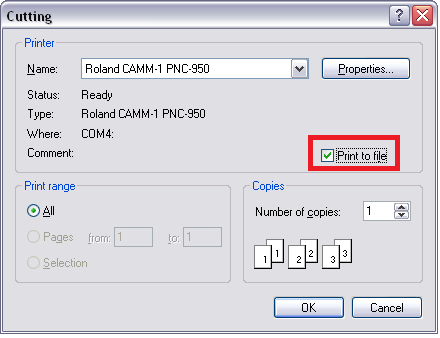
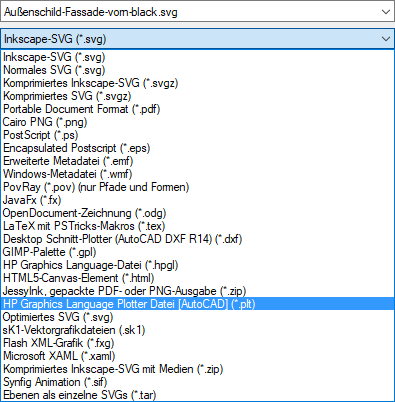
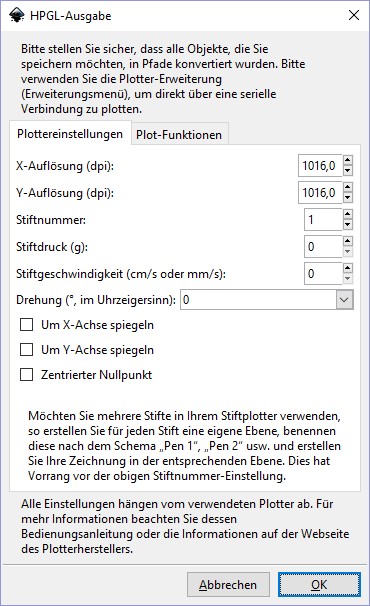
Neben der Direktausgabe an den Plotter können die Programme (ähnlich GCode) auch in Dateien umgeleitet werden. Ein paar Möglichkeiten:

<table border="1" id="bkmrk-inkscape-%2A.plt-inksc" style="border-collapse: collapse; width: 99.9734%; height: 689.317px;"><colgroup><col style="width: 33.289%;"></col><col style="width: 33.289%;"></col><col style="width: 33.289%;"></col></colgroup><thead><tr style="height: 38.1167px;"><td style="height: 38.1167px;">**Inkscape \*.plt**</td><td style="height: 38.1167px;">**Inkscape \*.hpgl**</td><td style="height: 38.1167px;">**Roland CutStudio**</td></tr></thead><tbody><tr style="height: 651.2px;"><td style="height: 651.2px;">"Speichern unter..." → "HP Graphics Language Plotter Datei \[AutoCAD\] (\*.plt)"

[![grafik.png](https://wiki.stadtfabrikanten.org/uploads/images/gallery/2025-10/scaled-1680-/dVGuSLCP9nRLSff8-grafik.png)](https://wiki.stadtfabrikanten.org/uploads/images/gallery/2025-10/dVGuSLCP9nRLSff8-grafik.png)
</td><td style="height: 651.2px;">"Speichern unter..." → "HP Graphics Language-Datei (\*.hpgl)"

[![grafik.png](https://wiki.stadtfabrikanten.org/uploads/images/gallery/2025-10/scaled-1680-/ZaOth17h1upo2Byh-grafik.png)](https://wiki.stadtfabrikanten.org/uploads/images/gallery/2025-10/ZaOth17h1upo2Byh-grafik.png)
</td><td style="height: 651.2px;">"Cutting" → "Print to file"

[![grafik.png](https://wiki.stadtfabrikanten.org/uploads/images/gallery/2025-10/scaled-1680-/XA8mqpQ69IelO9FJ-grafik.png)](https://wiki.stadtfabrikanten.org/uploads/images/gallery/2025-10/XA8mqpQ69IelO9FJ-grafik.png)

</td></tr></tbody></table>

## Plotterfolienreste

Übriges Material, was nicht mehr sinnvoll mit dem Plotter genutzt werden kann, kann in die unter dem DesignJet stehenden Restekisten einsortiert werden. Damit lassen sich noch kleinere Kunstwerke realisieren.

[![IMG_20260309_163217.jpg](https://wiki.stadtfabrikanten.org/uploads/images/gallery/2026-03/scaled-1680-/X2tIPHv5clfDsoJk-img-20260309-163217.jpg)](https://wiki.stadtfabrikanten.org/uploads/images/gallery/2026-03/X2tIPHv5clfDsoJk-img-20260309-163217.jpg)